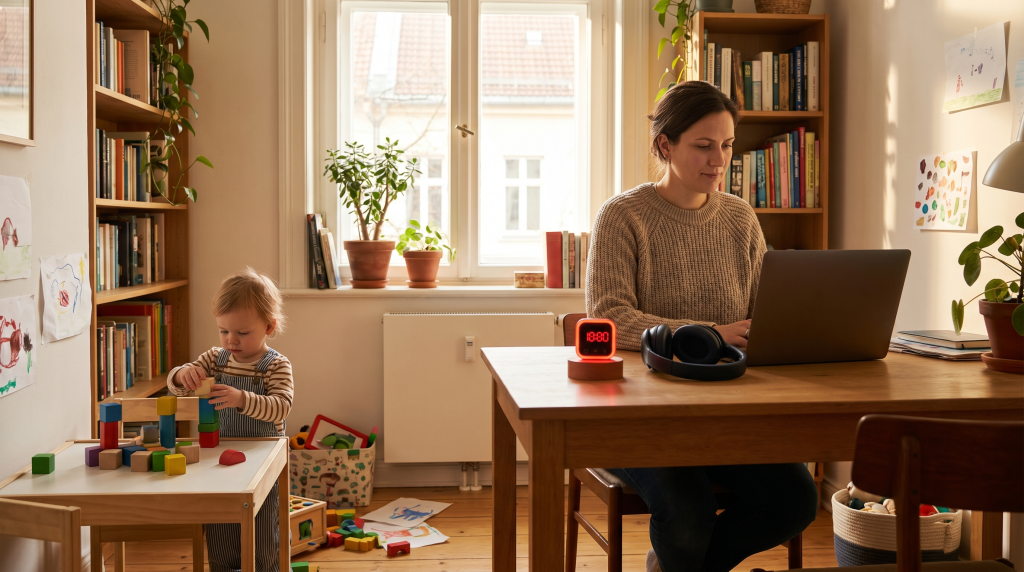
Your toddler is screaming. Your 6-year-old needs help with Zoom school. Your Slack is blowing up. And you have a deliverable due in two hours. Welcome to working from home with kids — the hardest productivity challenge there is.
If you have been Googling “how to stay focused when working from home with kids” at 11 PM while rocking a baby, you are not alone. Millions of parents are doing this every day, usually while feeling like they are failing at both parenting and work.
This guide is not about being a productivity superhero. It is about realistic, tested strategies that actually help — organized by age group, ranked from easiest to implement to requiring more setup. Pick what works for your situation and ignore the rest. You are doing better than you think.
1. Set Realistic Expectations (Before Anything Else)
The biggest mistake WFH parents make is expecting a normal 9-to-5 workday to coexist with kids at home. It will not. Accepting that upfront removes half the stress.
What realistic looks like by age:
- Toddlers (1–3): Expect 2–3 hours of focused work during nap time. Anything beyond that is bonus. Accept that you will be interrupted every 5-10 minutes when they are awake.
- Preschoolers (3–5): You can carve out 3–4 hours with structured independent play periods. They still need frequent check-ins and help with transitions.
- School-age (6–12): The sweet spot. Kids can self-entertain for 45–90 minute blocks. You can get a solid 5–6 hours of work done with good systems in place.
Communicate with your team: Tell your manager and coworkers when you have kid coverage and when you do not. Something as simple as “I am solo-parenting 8 AM–12 PM, available async only during that window” sets expectations and reduces panic when you go dark for an hour.
For more on setting boundaries, read our guide to common remote work mistakes — poor communication is the number one issue remote workers report.
2. Create Visual Boundaries Kids Can Understand
Kids do not understand “Mom has a meeting.” They understand visible signals. Here is how to build a kid-friendly workspace setup that communicates availability without words.
Three visual signals that work:
- Red light / green light system: A simple desk lamp or smart bulb. Red = do not interrupt unless someone is bleeding. Green = come on in. Even toddlers learn this within a week.
- Headphones = do not disturb: When noise-canceling headphones are on, Mom or Dad is in work mode. Pair this with the red light for a system that works across ages.
- Door sign flipper: A laminated sign on your door or desk with two sides — “Working: Come In for Emergencies Only” and “Available for Hugs and Snacks.” Let your kids flip it themselves when they need you; it gives them agency.
Physical setup tips: If possible, position your desk against a wall with your back to the room — this creates a psychological barrier and prevents kids from seeing your screen. For shared spaces, a simple room divider or bookshelf can create a defined “work zone” that kids learn to respect.
👉 Shop desk privacy screens and room dividers on Amazon
For a deeper dive on workspace design, check out our deep focus workspace setup guide.
3. Build a Morning Routine That Sets the Tone
Chaotic mornings lead to chaotic workdays. A consistent morning routine signals to your brain (and your kids) that work time is starting — even without a commute.
The 30-minute WFH parent morning routine:
- Wake up 30 minutes before your kids (if possible): Use this window for coffee, planning your day, or one focused task. This is often the most productive half-hour of your entire day.
- Feed everyone before work starts: Hangry kids interrupt more. A full breakfast plus snacks within reach buys you at least an hour of relatively uninterrupted time.
- Set up independent activities before your first meeting: Spend 5 minutes laying out puzzles, coloring books, or activity stations. The investment pays back tenfold in uninterrupted work time.
- Do a quick clean-up of your workspace: A cluttered desk makes a chaotic day feel worse. Two minutes of tidying before you sit down improves focus more than you would expect.
Weekend prep — the Sunday evening habit: Spend 15 minutes on Sunday evening setting up the week’s activity stations. Fill bins with fresh puzzles, rotate toys, and prep a few surprise activities (new coloring books, a fresh craft kit). When Monday morning chaos hits, you will already have everything ready. This one habit alone can save you 30+ minutes of scrambling every weekday.
4. Use Time-Blocking Designed for Parents
Standard Pomodoro (25 minutes work, 5 minutes break) does not work when a toddler needs a diaper change at minute 12. Here is a modified system built for real parenting chaos.
The Parent Pomodoro — 15/15 Rule:
- 15 minutes of focused work. Short enough to actually complete between interruptions.
- 15 minutes of kid engagement. Check in, refill snacks, change activities, give attention.
- Repeat. Two cycles = one productive hour.
Task-type matching by time of day:
- Nap time / quiet time: Deep work — writing, analysis, coding, creative tasks. Guard this window aggressively.
- Kids awake and independent: Shallow work — email, admin, Slack, scheduling. Tasks you can drop and resume easily.
- Kids need active supervision: Passive work — training videos, reading docs, planning. Anything you can do with one eye on a child.
- Post-bedtime: Catch-up or prep for tomorrow. Do not make this your primary work window — you will burn out within weeks.
Sample daily schedule (school-age kids, summer break):
- 6:00–7:00 AM — Deep work (kids asleep)
- 7:00–8:00 AM — Morning routine, breakfast together
- 8:00–10:00 AM — Focused work (kids doing independent activities)
- 10:00–10:30 AM — Kid check-in, snack, activity swap
- 10:30–12:00 PM — Meetings and shallow work
- 12:00–1:00 PM — Lunch together (real break)
- 1:00–3:00 PM — Quiet time / screen time window (your best afternoon work block)
- 3:00 PM onward — Wrap up, transition to parent mode
5. Build a Quiet Time Routine by Age
Quiet time is the single highest-leverage habit for WFH parents. It is a non-negotiable block — usually 60–90 minutes — where kids stay in a designated space with independent activities and no screen time (or limited educational screen time).
How to implement quiet time by age:
- Toddlers (1–3): Crib or playpen time with 2–3 rotating toys. Set a visual timer they can see. Start with 20 minutes and work up. This age group needs the most practice — expect resistance at first, consistency is everything.
- Preschoolers (3–5): Room time with activity stations. Rotate between puzzles, books, coloring, and building toys. A visual timer like the Time Timer helps them see exactly how long is left — a game-changer for reducing “how much longer?” questions.
- School-age (6–12): Reading, LEGOs, audiobooks, drawing, independent projects. Many kids this age enjoy the autonomy of quiet time once the routine is established. Start with 45 minutes and extend to 90 minutes over a few weeks.
👉 Time Timer Visual Clock — ~$25 on Amazon
6. Deploy Independent Activities That Actually Work
The right activities buy you uninterrupted work time. The wrong ones buy you five minutes and a mess to clean up. Here are battle-tested options by age group.
Toddlers (1–3):
- Water painting mats (no mess, reusable)
- Sticker books (get the reusable kind)
- Large building blocks (Duplo, Mega Bloks)
- Busy boards with latches, zippers, and switches
- Rotate toys weekly — old toys feel new after a week in the closet
Preschoolers (3–5):
- Kinetic sand or play dough at a small table
- Puzzles at their current skill level plus one challenge level
- Coloring books with washable markers
- Audiobooks (Spotify has great kids playlists, or use a Yoto Player)
- Activity subscription boxes — KiwiCo delivers age-appropriate projects monthly
School-age (6–12):
- LEGO or building sets with instruction booklets
- Chapter books and graphic novels
- Educational apps (Khan Academy Kids, Prodigy Math, Duolingo)
- Simple science experiment kits
- Origami or craft kits with clear instructions
The screen time strategy (guilt-free): Screen time is not a parenting failure — it is a tool. Use it strategically: schedule it for your most important meeting of the day or your deepest work block. Educational content (PBS Kids, National Geographic Kids) is better than passive YouTube, but any screen time that buys you 60–90 minutes of uninterrupted focus during a critical window is worth it. Release the guilt.
7. Invest in Noise Management
Kid noise is the number one enemy of phone calls and deep focus. Here is what actually helps:
- Noise-canceling headphones: The single best investment a WFH parent can make. The Sony WH-1000XM5 (~$328) is the gold standard — it blocks screaming, barking, and vacuuming. Budget pick: Anker Soundcore Space One (~$80) performs surprisingly well for the price. Need more options? See our full guide to the best noise-canceling headphones for remote work.
- Meeting apps with noise suppression: Zoom, Teams, and Google Meet all have background noise filtering. Turn it on in your audio settings — it can filter out kids playing in the next room remarkably well.
- White noise machine: Place one outside your door facing toward the kids’ area. It masks sudden noises that would otherwise break your concentration.
- Video baby monitor: For parents of younger kids, a monitor lets you check on napping children without leaving your desk. Shop video baby monitors →
8. Master the Emergency Reset Protocol
Some days everything falls apart. The quiet time activity was a bust. The meeting ran long. Someone is crying (maybe you). Here is your reset plan.
The 10-Minute Reset:
- Step away from your desk. Physically leave the room for 90 seconds. Breathe.
- Deploy the emergency activity. Every parent needs one fail-safe activity — something so engaging it buys you 30+ minutes with zero setup. For us, it is a fresh box of kinetic sand or a new episode of Bluey. Whatever works, have it ready.
- Triage your task list. Identify the one thing that absolutely must get done today. Everything else can wait.
- Communicate. Send a quick Slack message: “Kid emergency, back in 30.” Most colleagues understand — and the ones who do not are the problem, not you.
Backup plans when it all goes sideways:
- Call in your co-parent, partner, or grandparent for an emergency hour of coverage
- Screen time is your emergency parachute — use it without guilt
- If you absolutely must hit a deadline, a coffee shop or library with WiFi for an hour can save the day (if you have childcare coverage)
- Accept that some days, the work just does not get done — and that is okay
Quick Reference: 8 Strategies at a Glance
- Set realistic expectations — communicate your availability to your team
- Create visual boundaries — red light/green light system, headphones signal
- Build a consistent morning routine — 30 minutes before kids wake up is gold
- Time-block like a parent — deep work during quiet time, shallow work when kids are awake
- Establish daily quiet time — the single highest-leverage habit for WFH parents
- Rotate independent activities — fresh toys and activities buy you focus time
- Invest in noise-canceling headphones — the best money you will spend this year
- Master the 10-minute emergency reset — because some days just fall apart
The Bottom Line
Working from home with kids is genuinely hard. Anyone who tells you otherwise is either lying or has a full-time nanny. The strategies above will not make it easy — but they will make it possible.
Start with one thing: pick a visual boundary signal (the red light trick is the fastest win), establish a consistent quiet time block, or invest in noise-canceling headphones. One improvement compounds into more focus, less stress, and better work — and better parenting — over time.
You are doing a lot better than you think. The fact that you are reading a guide on how to improve means you care — and that is already most of the battle. Remember: your kids will not remember whether you replied to every Slack message within five minutes. They will remember that you were there — even if you were working from the next room with noise-canceling headphones on.
Related Guides
- How to Prevent Zoom Fatigue — meetings drain parents faster than anyone
- Home Office Deep Focus Setup — design a workspace that supports concentration
- 5 Common Remote Work Mistakes — including the communication traps that hurt parents most
Disclosure: This post contains affiliate links. If you purchase through these links, we may earn a small commission at no extra cost to you. We only recommend products we believe genuinely help WFH parents get through the day.

Sophia Carter has spent years testing productivity tools and workspace setups. She helps remote workers build efficient home offices that support deep focus, ergonomics, and better workflows.