Working from a coffee shop, a co-working space, or a hotel room while traveling brings a unique challenge: how do you stay productive without a permanent desk setup? After spending months working from different locations — airports, Airbnb’s, libraries, and cafes — I’ve learned that a portable home office isn’t about having the fanciest gear. It’s about having the right few pieces that pack small and set up fast.
This guide covers the essential portable home office tools that let you work productively from anywhere. I’ve tested each recommendation in real travel conditions — not just at my desk at home. The goal is simple: a complete workstation that fits in your carry-on and takes under 5 minutes to set up.
Quick Picks: Best Portable Home Office Gear in 2026
Short on time? Here are my top recommendations for working from anywhere:
| Product | Category | Why It Works for Travel | Price |
|---|---|---|---|
| Roost Laptop Stand | Ergonomics | Folds flat, fits in any bag | ~$75 |
| Logitech Pebble Keys 2 K380 | Keyboard | Compact, Bluetooth, multi-device | ~$40 |
| BAGSMART Electronics Organizer Bag | Bag | Organizer pockets for all gear | ~$100 |
| Anker PowerCore 20K | Power | All-day charge for laptop + phone | ~$55 |
| Logitech MX Anywhere 3S | Mouse | Ultra-flat, fits in laptop sleeve | ~$35 |
Why a Portable Home Office Is Different
A traditional home office is built around a fixed desk, chair, and monitor. A portable setup has completely different requirements. Every item you carry needs to earn its space in your bag — and it needs to set up and tear down quickly.
Through trial and error, I’ve narrowed down what actually matters when you’re working on the go:
- Weight and size: Every ounce counts when you are carrying it through an airport
- Setup speed: You should be productive within 5 minutes of sitting down
- Durability: Travel gear takes a beating. Flimsy equipment breaks fast
- Multi-device connectivity: Switching between laptop, tablet, and phone should be seamless
- Battery independence: You cannot always count on finding an available outlet
With these criteria in mind, here are the tools that have survived my actual travel testing and become permanent parts of my portable office kit.
1. Roost Laptop Stand — Best Portable Ergonomic Solution
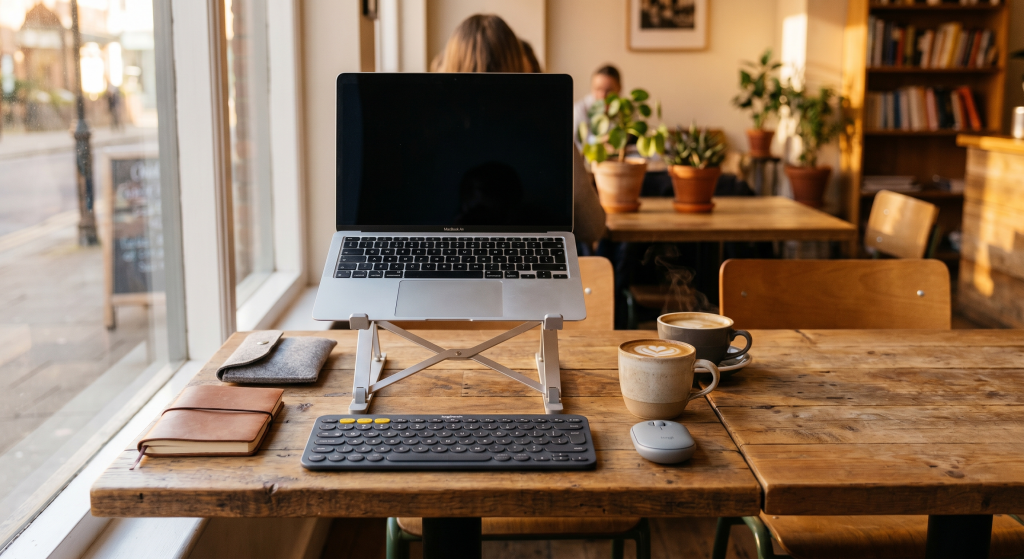
The Roost Laptop Stand is the single most important piece of my portable office. It elevates your laptop screen to eye level, preventing the neck strain that comes from hunching over a laptop at a cafe table. What makes it perfect for travel is that it folds down to the size of a pencil case and weighs almost nothing.
I’ve used mine in airport lounges, train seats, and standing desks at co-working spaces. It takes about 10 seconds to set up and feels surprisingly sturdy given how minimal it is. Paired with a separate keyboard and mouse, it transforms any surface into an ergonomic workstation.
- Folds flat to pencil-case size — fits any bag
- Sturdy enough for laptops up to 15 inches
- Open design allows airflow to prevent overheating
- Takes 10 seconds to set up or pack down
- Requires separate keyboard and mouse (added cost)
- Not adjustable for height — one position only
- Can feel tippy on uneven surfaces
2. Logitech Pebble Keys 2 K380 — Best Portable Keyboard
A good portable keyboard is essential when your laptop is elevated on a stand. The Logitech Pebble Keys 2 K380 is my top choice because it strikes the perfect balance between compact size and comfortable typing. It is small enough to slip into a bag sleeve but has full-sized keys that don’t feel cramped.
The multi-device pairing is a game-changer for remote work. You can switch between your laptop, tablet, and phone with the press of a button — no re-pairing required. Battery life is excellent (about 2 years on the included batteries). The quiet keys mean you won’t annoy people in a quiet co-working space.
- Compact but full-sized keys — comfortable for long typing sessions
- Pairs with 3 devices, switches instantly
- Incredible battery life (2 years on 2 AAA batteries)
- Quiet keys suitable for shared spaces
- No backlighting for low-light environments
- Round keys take some getting used to
- No USB-C charging (uses AAA batteries)
3. BAGSMART Electronics Organizer Bag — Best Travel Organizer
A portable office needs a bag that keeps everything organized. The BAGSMART Electronics Organizer Bag is designed specifically for keeping all your tech accessories organized while traveling. It has multiple compartments for cables, chargers, power banks, and adapters — everything has a place.
What sets this apart from a regular backpack is the organization. You never have to dig around to find a cable or charger. The briefcase-style opening gives you full access to everything at once. It’s slim enough to fit inside a larger travel bag or use on its own for a day of remote work.
- Dedicated pockets for every piece of gear
- Slim profile fits inside larger luggage
- Padded laptop compartment protects your device
- Premium materials hold up to regular travel wear
- Not a laptop bag — for accessories only
- May be too small for large laptops — not for carrying extra clothes
- Shoulder strap could be more padded
4. Anker PowerCore 20K — Best Portable Power
Running out of battery mid-workday is one of the most frustrating travel experiences. The Anker PowerCore 20K solves this by providing enough power to charge a laptop and phone simultaneously. At 20,000 mAh, it can charge most phones 4-5 times or a laptop once.
I never leave for a work session at a cafe without this in my bag. The dual USB ports mean you can charge your phone and charge your headphones at the same time. The PowerIQ technology delivers the fastest possible charge for whatever device you plug in.
- 20,000 mAh capacity — charges laptop + phone
- Dual USB ports for simultaneous charging
- Compact enough for a bag pocket
- PowerIQ auto-detects optimal charging speed
- Heavier than smaller power banks
- Does not support USB-C Power Delivery
- Takes several hours to recharge
5. Logitech MX Anywhere 3S — Best Portable Travel Mouse
A portable mouse is often overlooked but makes a huge difference in productivity when you are working on the go. The Logitech MX Anywhere 3S is designed specifically for travel. It is ultra-flat and slides into a laptop sleeve or pocket, yet provides comfortable ergonomic support when in use.
The USB-C rechargeable battery lasts up to 70 days on a full charge. It pairs via Bluetooth with up to 3 devices and switches between them instantly. The quiet clicks and Darkfield tracking make it perfect for coffee shops and co-working spaces.
- Compact design fits any bag pocket
- Works on any surface including glass
- USB-C rechargeable, 70-day battery
- Pairs with 3 devices, switches instantly
- Premium price point — takes adjustment
- Small size may not suit large hands (Bluetooth only)
- No included USB receiver (Bluetooth only)
How to Build Your Portable Office Kit
You don’t need all five items at once. Here is how I would build your kit based on where you work most often:
- Coffee shop worker: Start with the Roost stand and Logitech keyboard. These two give you the biggest ergonomic improvement for the lowest cost. Add the mouse next.
- Co-working space user: Add an organizer bag to keep everything tidy. Co-working spaces usually have power, so the battery bank is less urgent.
- Frequent traveler: Get the Anker power bank early. Airports and hotels do not always have convenient outlets near where you want to sit.
- Digital nomad: Invest in all five. When you are working from a new location every few days, having a complete, organized kit makes every transition faster and less stressful.
Frequently Asked Questions About Portable Home Office Setups
Can I really work productively from a coffee shop?
Yes, with the right setup. A laptop stand and external keyboard eliminate the ergonomic issues of working from a low table. Noise-canceling headphones (check our guide on best noise-canceling headphones for remote workers) handle the background noise. The key is having gear that sets up quickly so you’re not wasting 10 minutes unpacking every time you sit down.
What’s the most important piece of portable office gear?
The laptop stand. It prevents neck and shoulder strain that builds up over hours of hunching over a laptop. Without it, your portable office is actively harming your posture. Everything else is secondary.
How do I stay secure working from public Wi-Fi?
Use a VPN whenever you connect to public Wi-Fi. Many remote jobs provide one. If yours does not, services like NordVPN or ExpressVPN are worth the investment. Also avoid accessing sensitive accounts (banking, admin panels) on public networks.
Should I use a portable monitor?
A portable monitor is nice to have but not essential for most remote workers. I’d recommend starting with the laptop stand + keyboard combination first. If you find yourself needing more screen space regularly, then consider adding one. For most coffee shop and co-working sessions, a single laptop screen with good organization is sufficient.
Your Portable Office, Your Rules
The best portable home office setup is the one you actually carry with you. It is easy to over-pack your bag with equipment that stays in your hotel room because it’s too heavy or annoying to set up. Start with the laptop stand and keyboard — those two items make the biggest difference. Add the rest only when you genuinely feel the need.
For more home office setup inspiration, check out our guides on designing a deep focus workspace and building a complete home office on a budget.

David Park researches and reviews productivity software, AI tools, and automation workflows. He helps professionals work smarter by finding the tools that actually deliver results.