

If you’re searching for productivity desk accessories, you probably want one thing: tools that genuinely help you focus, work faster, and feel better at your desk. I get it. A cluttered desk drains energy. Poor posture causes fatigue. Tiny distractions add up.
Honestly? I used to think this was all hype. Then I spent three months working from a kitchen table with a laptop propped on a stack of books, and my neck basically staged a full-scale revolt. That’s when I started taking workspace ergonomics seriously.
The truth is simple: small, strategic upgrades can dramatically improve your workflow, ergonomics, and concentration. The right setup reduces friction. It supports deep work. It keeps you in flow longer — without you even noticing it’s doing that.
In this guide, we’re breaking down 15 productivity desk accessories that actually work, organized by category so you can prioritize the upgrades that matter most for your situation.
Disclosure: This post contains affiliate links. If you make a purchase, I may earn a small commission at no extra cost to you. I only recommend products I personally use and trust to boost productivity. Thank you for supporting my work!
Ergonomic Productivity Desk Accessories That Improve Comfort and Posture
These upgrades directly impact how your body feels during long work sessions — and that matters more than people realize. If you’re working six to eight hours a day at a desk, poor ergonomics isn’t just uncomfortable. It’s quietly eating into your focus and energy.
If you want to go deeper on the mechanics behind all this, our complete ergonomic home office setup guide covers desk height, monitor position, and the full picture.
1. Adjustable Laptop Stand
This was the first thing that actually made a noticeable difference in my setup. Before I had one, I was basically hunching over my laptop like I was reading a treasure map.
An adjustable laptop stand elevates your screen to eye level, which reduces neck strain and that forward head posture that creeps up on you over a long day.
As a bonus, it frees up the space underneath for a keyboard and mouse, which turns your laptop into a proper workstation. Your laptop runs cooler too — improved airflow is a real benefit. Easily one of the highest-ROI upgrades for any laptop-based remote work setup.
- Reduces neck strain significantly
- Frees desk space underneath for keyboard and mouse
- Improves laptop airflow and prevents overheating
- Works with any desk setup, any budget
2. Ergonomic Keyboard

If you type for a living — or even close to it — your keyboard deserves more thought than whatever came in the box.
An ergonomic keyboard is specifically designed for long typing sessions, with better wrist alignment that reduces the cumulative strain that adds up over months and years.
Some models have split layouts that feel strange for about a week, then suddenly feel incredibly natural. Others offer multi-device switching, which is a game-changer if you bounce between a laptop and a desktop. Want to compare your options? Check out our best budget mechanical keyboards review — we went through a lot of boards so you don’t have to.
- Better wrist alignment during long typing sessions
- Helps prevent repetitive strain over time
- Multi-device switching options available
- Great for writers, coders, and heavy email users
3. Wireless Productivity Mouse
A wireless ergonomic mouse is one of those upgrades where you don’t realize how bad your old one was until you try a good one.
The ergonomic shape reduces wrist and forearm tension in a way that’s genuinely felt by the end of a long day — less fatigue, less ache, more output.
The programmable buttons are underrated. Copy, paste, switching apps — these are tiny actions you repeat dozens of times an hour. Saving even half a second each time adds up. Plus, cutting the cable eliminates desk clutter and gives you a cleaner, calmer workspace. Our ergonomic mice roundup breaks down the top picks for all-day use.
- Ergonomic shape cuts wrist and forearm fatigue
- Programmable buttons speed up repetitive tasks
- No cable clutter for a cleaner desk setup
- Works on virtually any surface
4. Ergonomic Mouse Pad with Wrist Rest
This one looks like a minor thing. It’s not.
A wrist rest mouse pad cushions the pressure points during long scrolling or editing sessions, and that small comfort change has a surprisingly noticeable ergonomic impact over an eight-hour day.
It won’t completely replace a proper ergonomic setup, but as a low-cost, zero-effort add-on to your existing workspace, it punches above its price. If you do a lot of photo editing, video scrubbing, or any work with heavy mouse use, this is basically mandatory.
- Cushions wrist pressure during heavy mouse use
- Ideal for editors, designers, and scrollers
- Affordable ergonomic upgrade with no setup required
- Noticeably reduces end-of-day wrist discomfort
5. Adjustable Under-Desk Footrest
Nobody talks about footrests nearly enough, and that’s a shame — because your feet being in the wrong position affects your lower back, your hips, and your overall sitting posture more than you’d think.
A good adjustable footrest promotes proper sitting posture and circulation, and it’s especially valuable if your desk height isn’t perfectly set for your body.
If you’ve ever gotten that strange aching, restless feeling in your legs mid-afternoon, this is often the fix. We’ve done a full breakdown of the best options in our ergonomic footrest guide. For more on getting your full posture dialed in, our guide to the best sitting position for long hours is worth a read too.
- Improves the full posture chain reaction
- Reduces lower-back and leg fatigue
- Adjustable for different heights and desk setups
- Helps with that restless leg feeling in the afternoon
Desk Organization Accessories That Reduce Clutter and Visual Noise
Clutter kills focus. This isn’t just an opinion — it’s something you feel in your body the moment you sit down at a chaotic desk versus a clean one. These desk organization tools create a calmer, more intentional workspace without requiring a full redesign.
6. Extended Desk Mat / Desk Pad
This is one of those things that costs maybe $25 and makes your entire desk feel like a different setup. I’m not exaggerating.
An extended desk mat creates a unified, intentional workspace that just feels more put-together — and that visual coherence actually helps your brain shift into “work mode” faster.
It also softens the sound of your keyboard and mouse (your housemates will thank you), protects your desk surface from scratches and spills, and makes even a cheap flat-pack table feel a step above budget. If you’re building a minimalist desk setup on a budget, this is your starting point.
- Creates a unified, intentional workspace feel
- Reduces keyboard and mouse noise
- Protects desk surface from scratches and spills
- Affordable, instant visual and tactile upgrade
7. Premium Desk Mat with Built-In Organization

If you want to take the desk mat concept up a level, some premium versions include built-in cable holders and hidden document storage right in the design.
This is the desk accessory for people who genuinely want a clean desk setup — not just aesthetically, but functionally.
The integrated cable holder keeps your charging cords from sliding off the back of the desk (you know the feeling). The document pocket handles the “I’ll just put this here for now” papers that never actually move. It combines a minimalist office accessory with real, usable functionality — a rarer combination than it should be.
- Built-in cable management keeps cords in place
- Hidden document storage reduces surface clutter
- Aesthetics and practical function in one product
- Ideal for clean desk and minimalist office setups
8. Under-Desk Cable Tray and Cable Management Kit
Okay, I’ll admit it: the first time I actually tackled my cable situation properly, it felt like a slightly unreasonable amount of satisfaction for routing some wires through a plastic tray. But wow, does it matter.
A proper under-desk cable tray hides power strips and cable mess completely, delivering one of the fastest and most dramatic visual transformations of any desk upgrade on this list.
Beyond the aesthetics, hidden cables make your space safer and much easier to clean. If you’ve got a rat’s nest of cords under your desk right now, our full guide to cable management solutions for home offices walks through exactly how to tackle it step by step.
- Completely hides power strips and cable mess
- Instant and dramatic visual transformation
- Safer and far easier to clean around
- Works for any desk depth or configuration
9. Monitor Stand or Riser
A monitor riser does double duty: it elevates your screen to eye level (great for your neck), and it creates a useful storage shelf underneath for a keyboard, notepads, or small items.
It clears your primary working surface and adds vertical structure to your setup — a smart move for anyone working in a smaller space.
If you’re not ready to invest in a full monitor arm, a good riser is a practical, affordable alternative that delivers most of the benefit without the installation complexity. Worth every penny for a professional desk setup that feels intentional rather than thrown together.
- Screen at proper eye level for less neck strain
- Storage space created underneath
- Clears the primary working surface
- No tools or mounting hardware required
10. USB-C / Multi-Port Hub
Modern laptops have fewer ports than ever, which is fine until you need to connect a monitor, a USB drive, an SD card, and charge at the same time. Then it’s very much not fine.
A good USB-C docking hub connects multiple devices through a single cable, turning a “limited port” frustration into a clean, efficient docking station.
For anyone who does a lot of docking and undocking throughout the day — moving between a desk setup and meetings or travel — this single accessory genuinely changes your workflow. One cable in, everything works. It’s a small thing that becomes completely invisible once you have it, in the best possible way.
- One cable connects all your devices instantly
- Eliminates port-swapping friction throughout the day
- Ideal for modern slim laptops with limited inputs
- Speeds up your daily docking and undocking routine
Focus-Boosting Desk Accessories That Increase Deep Work
These tools directly support concentration and time management. The physical environment you work in shapes the quality of your attention — and these accessories help tip the odds in your favor. If you want to understand the science behind building a concentration-first workspace, our piece on deep work techniques goes into real detail.
11. Monitor Light Bar
Desk lighting solutions are underrated as a focus tool. Most people either work with harsh overhead lighting that flattens the room, or they squint at their screen in dim conditions and wonder why they’re tired by 3pm.
A monitor light bar is purpose-built to illuminate your desk without creating the screen glare that traditional lamps cause — and the difference on your eyes is remarkable.
It mounts on top of your monitor, takes up zero desk space, and is particularly valuable for late-afternoon or evening work sessions when natural light is fading. If you work in low-light environments at all, this should be near the top of your list.
- No glare on your screen — unlike traditional desk lamps
- Measurably reduces eye strain over long sessions
- Zero desk space footprint whatsoever
- Excellent for evening and low-light productivity sessions
12. Desk Timer or Pomodoro Timer
Your phone is a terrible timer. Every time you look at it to check the time, you’re one tap away from a notification rabbit hole. A dedicated physical desk timer — especially one built around the Pomodoro technique — solves this in a very satisfying way.
By keeping focused work blocks visible and physical, you build a discipline around deep work that an app notification simply cannot replicate.
There’s something about the visible countdown on a physical timer that creates real accountability. It’s a concentration tool for your desk that costs around $30 and earns its place by genuinely changing how you approach work. Time blocking becomes something you actually do, not just intend to do.
- Keeps your phone completely off the desk
- Encourages structured 25–50 minute focus blocks
- Visible countdown creates session accountability
- Builds real deep work discipline over time
13. Productivity Desk Pad or Weekly Planner
Digital to-do lists are fine. But there’s something about having your top priorities written right in front of you on the desk — physically visible at all times — that digital tools struggle to match.
A desk planner or weekly planner pad reduces the mental overhead of trying to remember what you’re supposed to be working on and keeps your most important tasks impossible to ignore.
It works especially well alongside digital tools, not instead of them. Use your app for detailed task management, and use the desk pad for the three things that absolutely need to happen today. Simple. Effective. And much harder to minimize or close than a browser tab.
- Top daily priorities always visible at the desk
- Reduces mental load and decision fatigue
- Works seamlessly alongside digital task tools
- Supports consistent time blocking habits
14. Noise-Canceling Headphones or Focus Headset
If you work in a shared space — a home with other people, a co-working spot, or an open-plan office — background noise isn’t just annoying. It actively degrades the quality of your thinking.
A good pair of noise-canceling headphones is the single most impactful focus desk accessory for anyone who works in a non-quiet environment.
They’re not just about blocking noise; they signal to others (and to yourself) that you’re in deep work mode. Flow states last longer. Cognitive load from constant ambient distraction drops significantly. We’ve put together a dedicated guide to the best noise-canceling headphones for remote work if you want a proper comparison before buying.
- Actively blocks ambient noise in shared environments
- Extends deep work and flow state sessions
- Essential for open offices and busy home setups
- Significantly reduces cognitive fatigue from distraction
Energy-Supporting Desk Accessories That Sustain Performance
Productivity isn’t just about tools — it’s energy management. You can have the perfect ergonomic setup and the cleanest desk on the planet, but if your energy crashes at 2pm, none of it matters. This last category is simple, but don’t underestimate it.
15. Reusable Insulated Water Bottle or Desk Mug
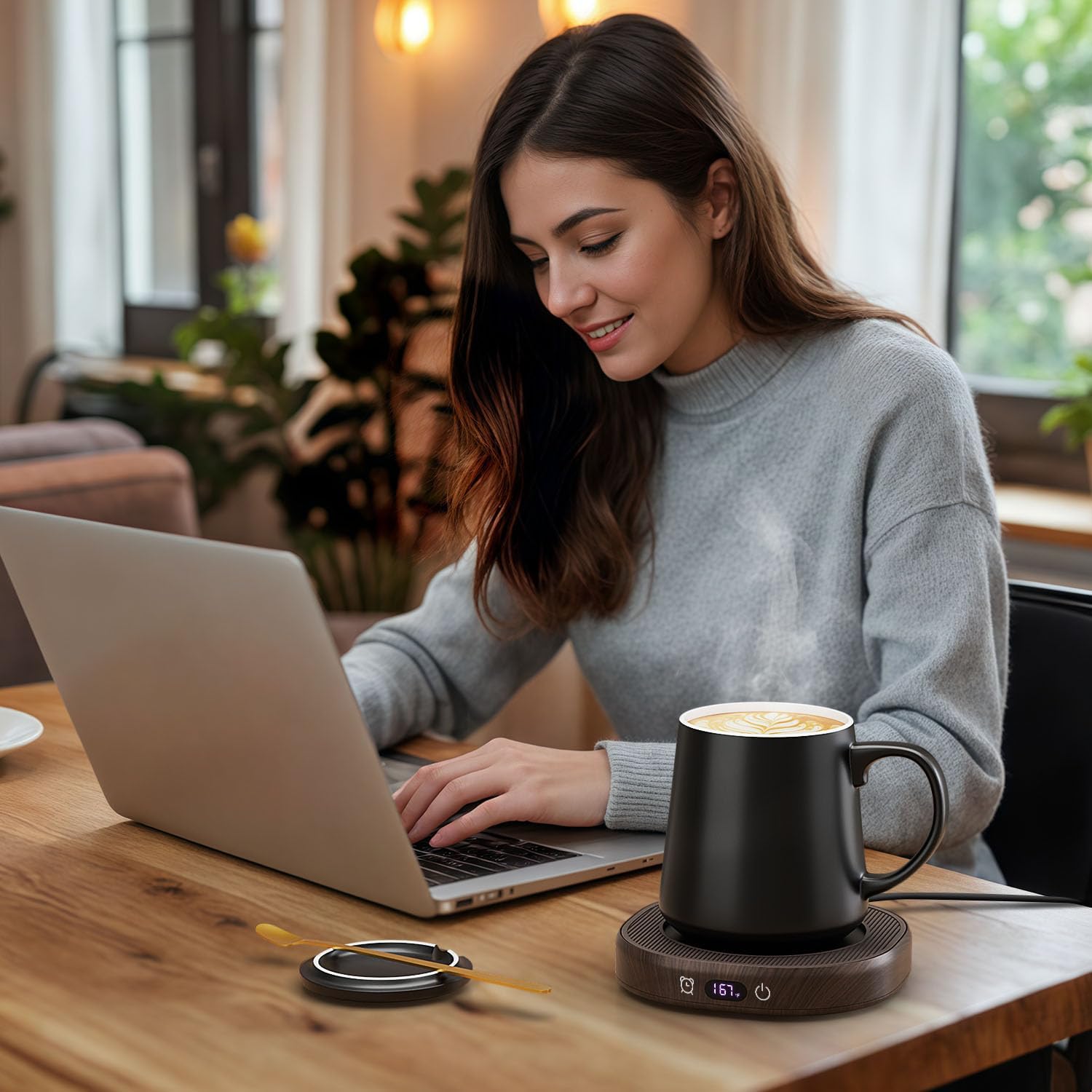
This is the most unsexy item on the list. It’s also, weirdly, one of the most effective.
Dehydration — even mild dehydration — measurably reduces concentration and cognitive performance. Having an insulated water bottle or mug that keeps your drink at the right temperature for hours means you’ll actually drink it, instead of ignoring a sad room-temperature glass you forgot about an hour ago.
The practical benefit is also real: fewer unnecessary trips to the kitchen means fewer unnecessary distractions that pull you out of your flow. It’s not glamorous. But it quietly supports consistent focus and energy across the whole workday.
💧 Worth knowing: Research consistently shows that even mild dehydration — as little as 1–2% body weight loss — can impair focus, working memory, and mood. Keeping water on your desk is one of the simplest performance tools available.
- Keeps drinks hot or cold for hours
- Reduces mid-session trips away from your desk
- Supports consistent energy and focus levels
- A small daily comfort that adds up over time
Build Your Best Workspace Strategically
The best productivity desk accessories aren’t flashy. They’re practical. They reduce friction. They improve posture. They eliminate clutter. They protect your focus. And they support your energy across a full workday.
If you’re not sure where to start, here’s the priority order that actually works:
- Start with ergonomics first. Laptop stand, keyboard, mouse. Your body is your most important piece of equipment.
- Then tackle cable management. The visual noise of a messy desk costs you more focus than you realize.
- Add focus tools. A timer and a desk planner build the habits; noise-canceling headphones protect the environment.
- Don’t forget energy. Hydration is boring advice that genuinely works.
Your desk should work for you — not against you. Choose intentionally, upgrade strategically, and build a setup that supports real deep work in 2026 and beyond.


