You spend eight hours a day with your hands on a keyboard — and yet most remote workers settle for the flat, mushy membrane keyboard that came bundled with their computer. Your fingertips deserve better. And you do not need to spend $150+ on a premium mechanical keyboard to get a great typing experience.
We tested eight budget mechanical keyboards across 50+ hours of real remote work. We evaluated them during morning standups, deep-focus afternoons, and late-night sprints. We prioritized quiet switches for conference calls, ergonomic layouts for all-day comfort, and durable materials that survive years of daily use. Every keyboard on this list costs under $70 and ships with Amazon Prime.
Best Budget Mechanical Keyboards at a Glance
Not every remote worker needs the same keyboard. Here is our quick segmentation to help you find the right one fast:
- Best Overall — Keychron C2 Pro: Full-size layout with number pad, PBT keycaps, and QMK/VIA programmability. The best balance of typing quality and features under $70.
- Best Value — Ajazz AK820 Pro: Gasket-mount design, tri-mode wireless, and hot-swappable switches — features normally found in $100+ keyboards.
- Best Wireless — Royal Kludge RK61: Ultra-portable 60% layout with Bluetooth, RGB, and hot-swappable switches. Pairs with 3 devices and fits in any bag.
- Best for Quiet Offices — Keychron C3 Pro: Pre-lubricated Red switches with sound-dampening foam. Quiet enough for open-plan offices and late-night typing sessions.
- Best Ergonomic — Keychron C1 Pro: TKL layout brings your mouse closer, reducing shoulder strain during 8-hour typing days. Hot-swappable and fully programmable.
- Best Multi-Device — Logitech K380: Switch between laptop, tablet, and phone with one button. 24-month battery life and near-silent keys. Under $30.
What to Look for in a Budget Mechanical Keyboard
Before diving into the reviews, here are the features that actually matter when you are shopping for a budget mechanical keyboard for remote work.
Switch Type
Mechanical switches come in three main categories: linear (Red — smooth, quiet, no bump), tactile (Brown — noticeable bump on each press, satisfying for typists), and clicky (Blue — loud click with each press, not suitable for shared spaces). For remote work, linear or tactile switches are best. Linear switches are ideal for open offices and shared home workspaces because they are the quietest. Tactile switches give typists satisfying feedback without excessive noise. Avoid clicky switches unless you work alone in a soundproofed room.
Layout Size
Full-size includes a number pad — best for data entry, accounting, and spreadsheet work. TKL (tenkeyless) removes the number pad and positions your mouse closer for better ergonomics — the sweet spot for most remote workers. 75% keeps function row and arrows in a compact footprint. 60% maximizes portability at the cost of dedicated keys. Choose based on your daily workflow, not aesthetics.
Keycap Material
PBT keycaps are textured, durable, and resist the shiny wear that develops on cheaper keycaps after months of use. ABS keycaps are more common on budget keyboards but will develop a slick, glossy surface over time. When possible, choose a keyboard with PBT keycaps — they feel better and last longer.
Hot-Swappable Switches
Hot-swappable keyboards let you pull out and replace switches without soldering. This means you can change how your entire keyboard feels in 15 minutes. Want quieter switches? Swap them in. Prefer a heavier tactile bump? Easy. If a switch breaks, you replace the switch — not the keyboard. Several options on this list offer hot-swap at no significant price premium.
Wired vs Wireless
Wired keyboards offer zero latency and never need charging — ideal for permanent desk setups. Wireless keyboards (Bluetooth or 2.4GHz) reduce cable clutter and support multiple device connections. For most remote workers, 2.4GHz wireless is fast enough that you will not notice any lag. Bluetooth is convenient for multi-device setups but can have slightly higher latency.
EDITOR’S CHOICE
1. Keychron C2 Pro — Best Overall Budget Mechanical Keyboard
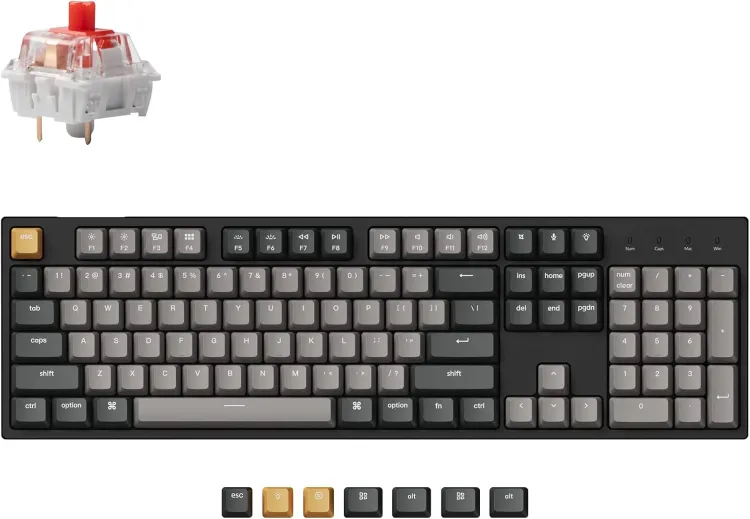
Price: $49–$69 | Best for: Writers, office workers, programmers who need a full-size layout with number pad
Key Features:
- Full-size layout with dedicated number pad for productivity
- Double-shot PBT keycaps resist shine and stay textured for years
- QMK/VIA programmability for custom keymaps and macros
- Choice of Keychron K Pro Red or Brown switches for preferred feel
- Removable braided USB-C cable with solid build quality
The Keychron C2 Pro delivers the best balance of typing quality, features, and affordability of any budget mechanical keyboard we tested. This full-size board includes a dedicated number pad, making it ideal for anyone who regularly enters data, works with spreadsheets, or simply prefers a traditional layout.
The typing experience is where the C2 Pro really shines. Keychron’s K Pro switches come in your choice of Red (smooth, linear) or Brown (tactile bump, great for typists), and the double-shot PBT keycaps feel substantial under your fingers. Unlike cheaper ABS keycaps that develop a shiny, worn look after months of use, these hold up beautifully over time.
Programmability through QMK/VIA software lets you customize key functions, create macros, and remap keys to match your workflow. The removable braided USB-C cable and solid build quality are touches rarely found at this price. If you pair this with a good desk setup, the C2 Pro becomes the centerpiece of a productive workstation. For an extra $15–20, you can upgrade to hot-swappable switches and RGB backlighting.
- Full-size layout with dedicated number pad for productivity
- Double-shot PBT keycaps resist shine and stay textured for years
- QMK/VIA programmability for custom keymaps and macros
- Choice of Keychron K Pro Red or Brown switches for preferred feel
- Removable braided USB-C cable with solid build quality
- Plastic chassis lacks the premium heft of aluminum keyboards
- RGB backlighting and hot-swap features cost extra
- Wired-only — no Bluetooth or 2.4GHz wireless option
Who should buy: Office workers and writers who need a reliable full-size keyboard with a number pad and excellent typing feel at an affordable price. The QMK/VIA programmability makes it ideal for anyone who wants to customize shortcuts and macros for their specific workflow.
Who should skip: Users who want wireless connectivity or a premium aluminum build. If desk space is tight, the 75% Ajazz AK820 Pro or compact Royal Kludge RK61 are better fits.
BUDGET PICK
2. Ajazz AK820 Pro — Best Value Mechanical Keyboard
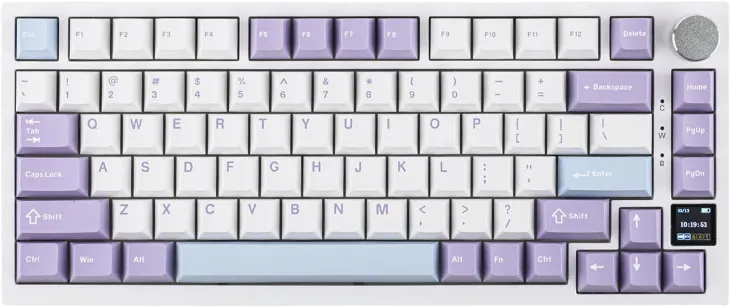
Price: $59–$69 | Best for: Typists who want premium features at a budget price, multi-device users
Key Features:
- Exceptional features-to-price ratio with gasket-mount design
- Tri-mode connectivity: Bluetooth, 2.4GHz wireless, and USB-C
- Hot-swappable switches — change your typing feel anytime
- Compact 75% layout with PBT keycaps saves desk space
- Programmable rotary knob for volume, scrolling, or macros
The Ajazz AK820 Pro is the best value mechanical keyboard we tested, packing features normally found in $100+ boards into a $60 package. The 75% layout keeps the function row and arrow keys while saving significant desk space. Once you have found the right keyboard, optimize your full desk setup to complete your workstation.
The typing feel is surprisingly premium thanks to the gasket-mount design. The PCB sits on soft gaskets inside the case, creating a slightly cushioned, flexy feel on each keystroke. Combined with the smooth Flying Fish linear switches and PBT keycaps, it is one of the most satisfying typing experiences under $70.
What really sets the AK820 Pro apart is its connectivity. You can pair via Bluetooth to multiple devices, use the 2.4GHz wireless dongle for gaming-grade low latency, or plug in with USB-C. The small TFT display shows battery and connection status, and the programmable rotary knob is genuinely useful for volume control or document scrolling.
- Exceptional features-to-price ratio with gasket-mount design
- Tri-mode connectivity: Bluetooth, 2.4GHz wireless, and USB-C
- Hot-swappable switches — change your typing feel anytime
- Compact 75% layout with PBT keycaps saves desk space
- Programmable rotary knob for volume, scrolling, or macros
- Companion software is difficult to find and navigate
- Keycap design is plain compared to more premium boards
- Compact 75% layout requires adjustment if coming from full-size
Who should buy: Remote workers who want premium features like gasket mounting, wireless connectivity, and hot-swappable switches without spending over $70. The compact layout is ideal for clean desk setups where space matters.
Who should skip: Users who rely heavily on a number pad for data entry or want polished companion software for extensive key remapping. If wireless isn’t a priority, the Keychron C2 Pro offers similar quality with a full-size layout.
BEST WIRELESS
3. Royal Kludge RK61 — Best Wireless Portable Keyboard
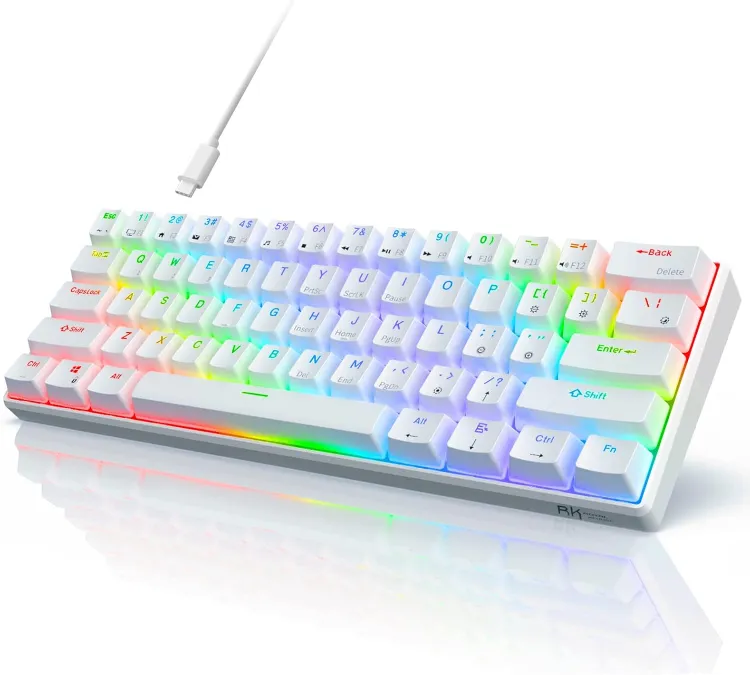
Price: $39–$49 | Best for: Digital nomads, students, anyone who types across multiple devices
Key Features:
- Ultra-portable 60% layout at just 11.4 x 4 inches and 1.5 lbs
- Bluetooth connects to 3 devices simultaneously with quick switching
- Hot-swappable switches — customize typing feel or replace worn switches
- RGB backlighting with multiple effects for visual customization
- 1,450mAh battery lasts through a full workday with lighting on
The Royal Kludge RK61 is the keyboard to get if portability matters. At just 11.4 × 4 inches and under 1.5 pounds, this 60% keyboard slips easily into any bag. Despite its compact size, it delivers a genuinely good typing experience with hot-swappable switches and satisfying tactile feedback.
Bluetooth connectivity pairs with up to three devices simultaneously. You can type on your laptop, tap out a message on your tablet, then switch back — all with a key combination. The 1,450mAh battery lasts about 10 hours with RGB backlighting on, or several weeks with it off. That is more than enough for a full workday at a coffee shop or co-working space.
The default Brown switches provide a nice tactile bump without being too loud for public spaces. And because the switches are hot-swappable, you can swap in quieter linear switches for libraries or clicky switches for home use — no soldering required. Consider pairing this with a cable management system for a truly clean portable setup.
- Ultra-portable 60% layout at just 11.4 x 4 inches and 1.5 lbs
- Bluetooth connects to 3 devices simultaneously with quick switching
- Hot-swappable switches — customize typing feel or replace worn switches
- RGB backlighting with multiple effects for visual customization
- 1,450mAh battery lasts through a full workday with lighting on
- 60% layout requires significant adjustment — no dedicated arrow keys or function row
- ABS keycaps show wear and shine faster than PBT alternatives
- Not ideal for extended numeric data entry without a separate numpad
Who should buy: Digital nomads, students, and remote workers who work from coffee shops, co-working spaces, or multiple locations. The combination of portability, wireless freedom, and hot-swappable customization is hard to beat at this price.
Who should skip: Users who rely heavily on dedicated arrow keys, a function row, or a number pad. The compact layout requires memorizing function-layer shortcuts, which can slow you down if your workflow depends on those keys.
BEST FOR OFFICE
4. Keychron C3 Pro — Best Quiet Mechanical Keyboard for Shared Workspaces
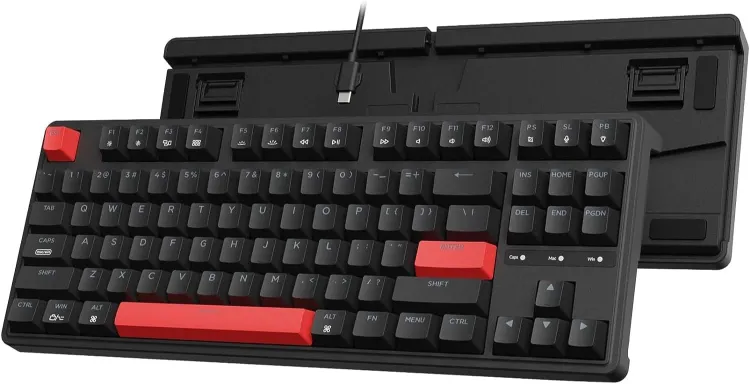
Price: $44–$54 | Best for: Office workers, shared workspaces, late-night typists who need quiet operation
Key Features:
- Pre-lubricated Red linear switches with internal foam for ultra-quiet typing
- QMK/VIA programmability for custom keymaps and macros
- Tenkeyless layout saves desk space while keeping arrow keys and function row
- Sound-dampening foam throughout for a muted, professional sound profile
- Solid build quality at an accessible $44 starting price
The Keychron C3 Pro is built for quiet environments. If you work in an open-plan office, share a home workspace with a partner, or type late at night while others sleep, this is the keyboard you want. The pre-lubricated Red linear switches combined with internal sound-dampening foam produce a muted, low-profile sound that will not disturb anyone nearby.
This is a tenkeyless (TKL) layout — you get the full alphanumeric section, function row, and dedicated arrow keys, but without the number pad taking up desk space. It is a great middle ground between full-size and compact layouts. QMK/VIA programmability lets you remap keys and create custom macros, which is rare at this price point.
The white backlight provides just enough illumination for dim environments without the distraction of RGB. The premium model adds RGB and hot-swappable switches for about $10 more. If you are also looking to reduce desk clutter, check out our guide on the best monitor arms to free up even more workspace.
- Pre-lubricated Red linear switches with internal foam for ultra-quiet typing
- QMK/VIA programmability for custom keymaps and macros
- Tenkeyless layout saves desk space while keeping arrow keys and function row
- Sound-dampening foam throughout for a muted, professional sound profile
- Solid build quality at an accessible $44 starting price
- ABS keycaps instead of more durable PBT — may show shine over time
- No wireless connectivity — USB-C wired only
- Base model lacks hot-swappable switches and RGB
Who should buy: Anyone who types in a shared space or quiet environment. The dampened Red switches are genuinely quiet — your officemates or family members will thank you. The TKL layout hits the sweet spot between space efficiency and full functionality.
Who should skip: Users who want wireless connectivity or a more premium typing feel with PBT keycaps out of the box. If you work alone and noise isn’t a concern, the Ajazz AK820 Pro offers more features for a similar price.
BEST ERGONOMIC
5. Keychron C1 Pro — Best Ergonomic Keyboard for Long Typing Sessions
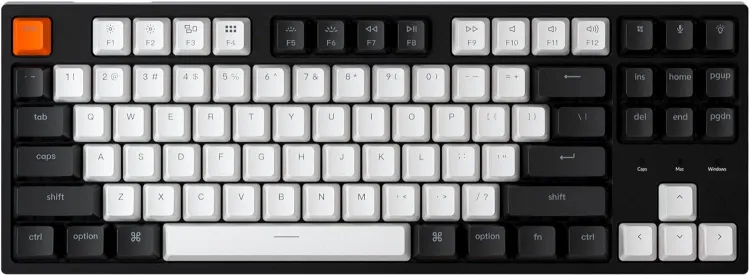
Price: $49–$59 | Best for: Writers, developers, and anyone who types for 6+ hours a day
Key Features:
- TKL layout positions mouse closer, reducing shoulder strain in long sessions
- Double-shot PBT keycaps maintain texture through thousands of typing hours
- QMK/VIA programmable — create macros and remap keys for your workflow
- Hot-swappable switches let you change typing feel without buying a new board
- USB-C connectivity with zero latency for fast, responsive typing
The Keychron C1 Pro is designed for people who spend their entire workday typing. The TKL layout positions your mouse closer to your body, reducing shoulder strain that builds up over 8-hour sessions with full-size keyboards. Combined with the comfortable Keychron K Pro switches and double-shot PBT keycaps, every keystroke feels deliberate and satisfying.
What makes this keyboard stand out for long sessions is the combination of QMK/VIA programmability and hot-swappable switches. You can program dedicated macro keys for repetitive tasks, remap your most-used shortcuts to easier reaches, and — if you ever want to change switch types — just pull and replace without soldering. This adaptability means the keyboard grows with your needs.
The PBT keycaps maintain their textured, matte feel even after thousands of hours of typing. They won’t develop the slippery shine that ABS caps do. The adjustable feet let you set a comfortable typing angle, and the USB-C connection is rock-solid with zero latency. If you are dealing with wrist fatigue, pairing this with an ergonomic chair can transform your entire workday comfort.
- TKL layout positions mouse closer, reducing shoulder strain in long sessions
- Double-shot PBT keycaps maintain texture through thousands of typing hours
- QMK/VIA programmable — create macros and remap keys for your workflow
- Hot-swappable switches let you change typing feel without buying a new board
- USB-C connectivity with zero latency for fast, responsive typing
- No wireless option — wired USB-C only
- No dedicated wrist rest included — may need a separate one for all-day comfort
- Plastic case can sound slightly hollow without additional dampening mods
Who should buy: Writers, developers, and remote workers who type for 6+ hours daily. The closer mouse positioning and programmable layout genuinely reduce fatigue over long sessions. If you have ever ended a workday with sore shoulders or wrists, this layout helps.
Who should skip: Users who need a number pad for data entry or accounting work. If wireless is a must-have, consider the Ajazz AK820 Pro or Royal Kludge RK61 instead.
BEST MULTI-DEVICE
6. Logitech K380 — Best Multi-Device Compact Keyboard
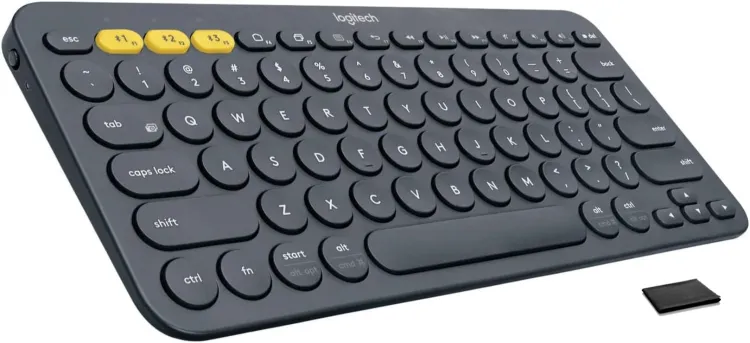
Price: $29–$39 | Best for: Users who switch between laptop, tablet, and phone throughout the day
Key Features:
- Seamlessly switches between 3 Bluetooth devices with one button press
- Near-silent scissor-switch keys — quieter than any mechanical board
- 24-month battery life on 2 AAA batteries — practically forget about power
- Ultra-compact footprint smaller than a standard mousepad
- Under $30 — the most affordable multi-device keyboard available
The Logitech K380 is the most affordable and versatile keyboard on this list. It connects to up to three devices via Bluetooth and switches between them with a single button press. If you type on your laptop during meetings, respond to messages on your tablet, and occasionally draft on your phone, the K380 eliminates the need for multiple keyboards.
Unlike the mechanical keyboards above, the K380 uses scissor-switch keys that feel similar to a high-quality laptop keyboard. The keys are round, compact, and surprisingly comfortable for extended typing. They are nearly silent — ideal for shared workspaces where even dampened mechanical switches might draw attention.
Battery life is exceptional. Two AAA batteries last up to 24 months with typical use, so you will almost forget the K380 even needs power. It pairs instantly when you wake your device and never drops connection. At ~$30, it is the easiest recommendation for anyone who values simplicity and multi-device flexibility over mechanical switch feel.
- Seamlessly switches between 3 Bluetooth devices with one button press
- Near-silent scissor-switch keys — quieter than any mechanical board
- 24-month battery life on 2 AAA batteries — practically forget about power
- Ultra-compact footprint smaller than a standard mousepad
- Under $30 — the most affordable multi-device keyboard available
- Not mechanical — scissor-switch keys lack the tactile satisfaction of mechanical switches
- Round keycaps take getting used to — typing accuracy dips for the first few days
- No backlighting — unusable in dark environments without external light
Who should buy: Multi-device users who bounce between a laptop, tablet, and phone during the workday. The instant device switching and near-silent keys make this perfect for anyone who takes calls or works in shared spaces. It is also the best choice if you are on a tight budget.
Who should skip: Users who want a mechanical typing experience with tactile feedback and key travel. If you are a writer or programmer who types for long hours and loves the feel of mechanical switches, the Keychron C3 Pro or Ajazz AK820 Pro are better investments.
Frequently Asked Questions
Are budget mechanical keyboards worth it?
Absolutely. The gap between budget and premium mechanical keyboards has narrowed significantly. A $50 Keychron or Ajazz keyboard today delivers PBT keycaps, hot-swappable switches, and programmability — features that were exclusive to $150+ boards just five years ago. The typing feel upgrade over a standard membrane keyboard is immediately noticeable, and budget mechanical keyboards last far longer than their membrane counterparts.
Which switch type is best for office work?
For shared offices, linear switches (Red) are the quietest option, especially when pre-lubricated. Tactile switches (Brown) offer a satisfying bump without the loud click of Blue switches and are generally safe for offices with moderate background noise. Avoid clicky switches (Blue) in any shared workspace — they are noticeably loud and will annoy your coworkers. If noise is a primary concern, the Keychron C3 Pro with its dampened Red switches is the quietest option on this list.
Are wireless mechanical keyboards reliable?
Modern wireless mechanical keyboards are extremely reliable. The Ajazz AK820 Pro and Royal Kludge RK61 both offer Bluetooth and 2.4GHz wireless connections that are stable for everyday typing. 2.4GHz dongles provide near-zero latency and are ideal for fast typists. Bluetooth is convenient for multi-device users but can have slightly more latency. For competitive gaming, wired is still preferred, but for remote work typing, wireless is more than capable.
Full-size vs TKL vs compact — which layout should I choose?
Full-size includes a number pad and is best for anyone doing regular data entry, accounting, or spreadsheet work. TKL (tenkeyless) removes the number pad, positions your mouse closer for better ergonomics, and is the sweet spot for most remote workers. Compact layouts (75%, 65%, 60%) maximize desk space but sacrifice dedicated keys like the function row or arrow keys — better for portability than all-day productivity for most users.
What is hot-swappable and why does it matter?
Hot-swappable keyboards let you pull out and replace switches without soldering. This means you can change how your keyboard feels and sounds in minutes. Love the keyboard layout but wish it was quieter? Swap in silent switches. Want a more tactile bump? Drop in heavier tactile switches. Hot-swap capability future-proofs your keyboard — if a switch breaks, you replace the switch, not the entire board. The Ajazz AK820 Pro, Royal Kludge RK61, and Keychron C1 Pro all offer hot-swap.
How much should you spend on a budget mechanical keyboard?
$40 to $70 is the sweet spot for budget mechanical keyboards in 2026. Below $40, you will make significant compromises on keycap quality, switch feel, and build materials. Above $70, you enter mid-range territory where improvements become incremental rather than transformative. Every keyboard on this list falls in the $29–$69 range and delivers excellent value at its price point.
The Bottom Line
The best budget mechanical keyboard for you depends on your specific remote work setup. If you need the full package — number pad, PBT keycaps, programmability, and proven reliability — the Keychron C2 Pro is our top recommendation. If you want the most features for your dollar, the Ajazz AK820 Pro delivers gasket-mount typing feel and tri-mode wireless at an unbeatable price.
For those who work in shared spaces or need ultra-quiet operation, the Keychron C3 Pro with its dampened Red switches is the obvious choice. And if you type across multiple devices all day, the Logitech K380 makes switching effortless at under $30.
Whichever keyboard you choose from this list, you are upgrading from the membrane board that came with your computer — and your fingertips will feel the difference on day one. For more ways to upgrade your home office, check out our guides on the best remote work productivity gear and home office desk setup ideas.

Sophia Carter has spent years testing productivity tools and workspace setups. She helps remote workers build efficient home offices that support deep focus, ergonomics, and better workflows.