

Most "best focus apps" lists rank tools as if they all do the same job. They don't. A website blocker, a focus timer and a to-do app fix three different problems, and a tool built for one can't fix another. A blocker can't tell you what to work on, and a to-do list can't keep you off your phone.
Quick answer: which focus app should you use?
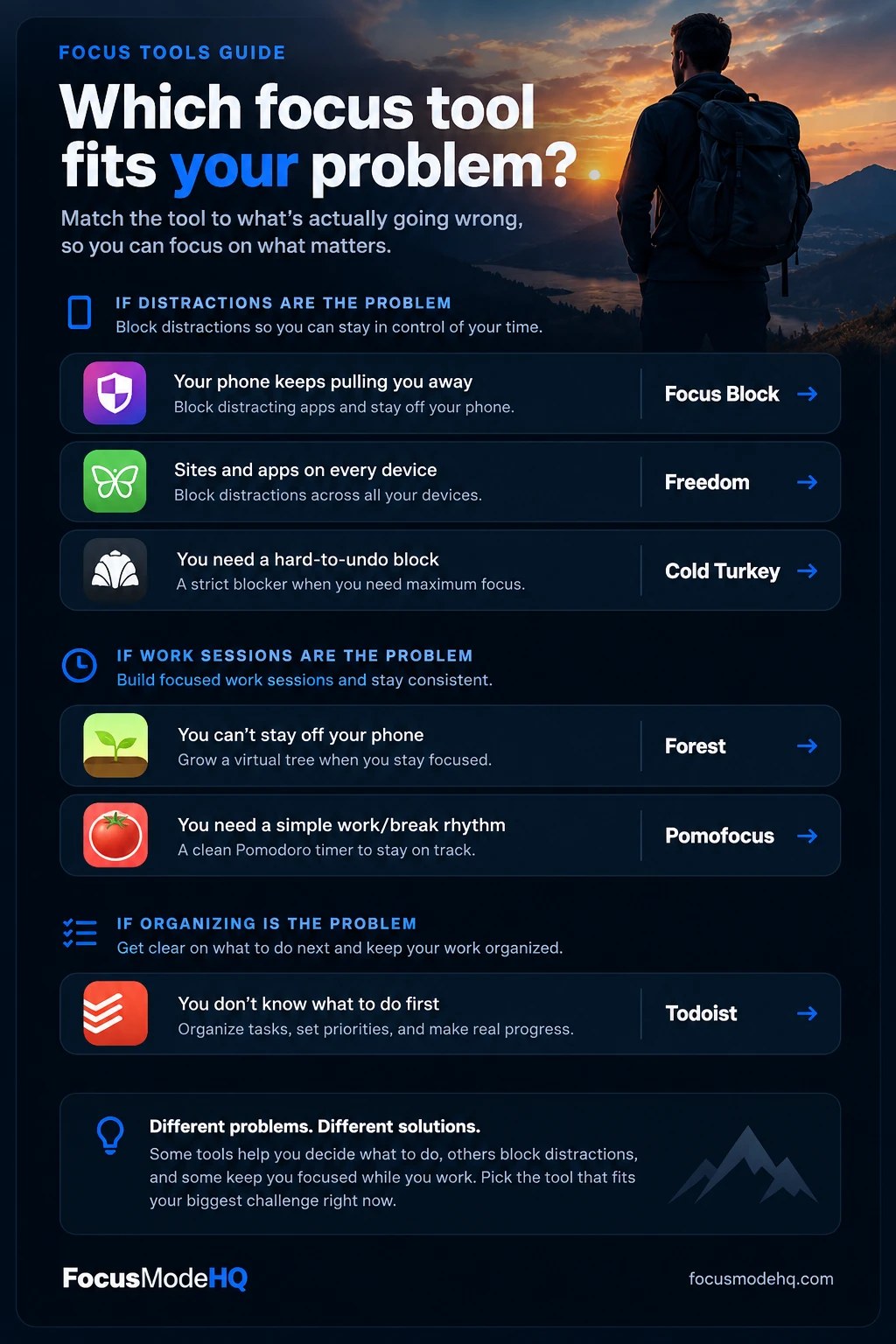
The best focus app depends on what pulls you off task. Start with Todoist if you never know what to work on first. Use Focus Block if your iPhone is the problem, Freedom to block sites and apps on your phone and computer, Cold Turkey for a strict lock on a Windows or Mac computer, and Forest or Pomofocus to structure work sessions.
Productivity problems come from different places: not knowing what to work on, getting distracted while you work, or struggling to keep focused work sessions going. Todoist is our top recommendation for the first problem. It is a task manager, so it helps you organize tasks, set priorities and decide what to do next. It is not a website blocker or a timer, so the blockers and timers below cover the other two.
- TodoistBest for Task ManagementOrganize your tasks, prioritize your work, and turn an overwhelming to-do list into a clearer plan for the day. Start with Todoist's free plan (affiliate link)
- Focus BlockBlockerPhone distractions on iPhone. A newer app with a short track record.
- FreedomBlockerBlocking sites and apps on your phone and computer at once.
- Cold TurkeyBlockerStrict blocking on Windows or Mac, with a free version.
- ForestTimerStaying off your phone during a work session.
- PomofocusTimerA simple, free work-and-break rhythm in your browser.
Focus apps compared at a glance
The tag under each name shows what kind of tool it is, which matters more than any feature list. Platforms and prices come from each product's official pages and were checked on October 30, 2026. Prices change and vary by region, so confirm before you buy.
| Tool | Best for | Main purpose | Platforms | Pricing and free plan |
|---|---|---|---|---|
| Task managerTodoist | Organizing tasks and priorities | Captures tasks, sets priorities and shows what to do today | Web, iOS, Android, Mac, Windows, Linux, Apple Watch, Wear OS and browser extensions | Free Beginner plan. Pro is $7/month, or $60 billed yearly ($5/month). 7-day Pro trial. |
| BlockerFocus Block | Phone distractions on iPhone | Blocks chosen apps on demand or on a schedule | iPhone (iOS 18 or later). Android planned, no date. | 7-day free trial, then a subscription. Check the App Store for current prices. |
| BlockerFreedom | Blocking across phone and computer | Blocks websites, apps or the whole internet in sessions that sync across devices | Mac, Windows, iOS, Android, Chromebook | Free plan. Premium from $3.33/month billed yearly, or $8.99/month. One-time "Forever" plan listed at $99.50. 7-day Premium trial. |
| BlockerCold Turkey | Strict blocking on a computer | Blocks websites (free) and apps (Pro), with locks that are hard to undo | Windows, macOS. No mobile version. | Free version with website blocking. Pro is a US$45 one-time payment. 7-day Pro trial. |
| TimerForest | Staying off your phone during a work session | Gamified focus timer with optional app blocking | iPhone/iPad, Android, Chrome and Firefox extension | Free to start. Optional Plus subscription, with prices that vary by region and app store. |
| TimerPomofocus | Work-and-break structure | Pomodoro timer with a task list and reports | Browser, plus Mac, Windows and Linux apps | Free. Optional Premium adds projects, exports, a Todoist integration and no ads. Price not published on the page we checked. |
Which type of tool do you need? Start with your biggest focus problem
Before comparing apps, work out which of three problems you have. Ask yourself one question: when I get distracted, do I know what I should be doing?
"No, I'm not sure what to work on"
Tasks live in your head, your inbox and sticky notes, and you spend the first hour deciding. A blocker would only give you a quieter screen with nothing to do on it. You need one trusted list.
Tool: Todoist. If this sounds like you, start with Todoist's free plan (affiliate link) or read the Todoist section first.
"Yes, but I switch to something else"
You know the task, but your phone, social media, news or video sites keep winning. You open them without deciding to. The fix is making them harder to open.
Tools: Focus Block, Freedom, Cold Turkey
Blocker vs. timer vs. task manager
| Type | What it fixes | What it can't fix | Our picks |
|---|---|---|---|
| Task manager | Deciding what matters and remembering it | Distractions and the work itself | Todoist |
| Distraction blocker | Impulse switching to apps and sites | Not knowing what to work on, or drifting within a task | Focus Block, Freedom, Cold Turkey |
| Focus timer | Starting, pacing and taking breaks | Distractions outside the app, unless it also blocks | Forest, Pomofocus |
Affiliate disclosure: Todoist is an affiliate partner. The Todoist links in this article are affiliate links, so Focus Mode HQ may earn a commission if you purchase a qualifying plan through them, at no additional cost to you. The links to Focus Block, Freedom, Cold Turkey, Forest and Pomofocus go to each tool's ordinary, official website, and we do not earn a commission from them. Some of these tools may become affiliate partners over time. We recommend Todoist because it solves a problem blockers and timers don't, and we list its limits below. See our full Affiliate Disclosure.
Todoist: the task manager for deciding what to focus on
Blockers and timers protect your attention. Neither tells you where to point it. That is the job of a task manager, and Todoist is the one we recommend.
Todoist: tasks, priorities and a daily plan
Task manager · all devices
Best for people who lose time deciding what to do, or who keep tasks in too many places.
What Todoist does
Todoist is a to-do list and task manager. You add tasks quickly, often by typing them in plain language, sort them into projects, give them priorities and dates, and see what's due today. It runs on the web, phones, desktops, watches and as browser extensions, with tasks syncing between them.
Why organizing tasks matters for focus
Much of what feels like a focus problem is really a decision problem. When you don't have a clear next action, switching to something easier feels natural. This is our observation, not a research finding. A single trusted list gives your protected time a target, and gives stray thoughts somewhere to go so you don't act on them mid-task.
How it helps you set priorities
- Quick Add: type something like "send invoice every Friday p2" and Todoist can read the date and priority from the text.
- Priorities: Todoist has four priority levels. In Today and Upcoming, higher-priority tasks appear near the top, below tasks that have a set time.
- Projects, labels and filters: group work by project, tag tasks (for example "phone call"), and save filters such as "p1 tasks due this week".
- Layouts: view the same project as a list or a board. Pro adds a calendar layout.
Practical ways to use it
- Pick three tasks for today. Each morning, give up to three tasks a due date of today and mark the most important as p1. Everything else waits.
- Park interruptions. When a stray idea or errand pops up mid-session, add it to your Inbox and go back. Todoist's own Pomodoro guide suggests capturing interruptions this way.
- Break big tasks down. Turn "write report" into sub-tasks like "outline," "draft intro" and "add charts" so you always know the next small step.
- Repeat what recurs. Set weekly tasks like "review calendar every Friday" once, so they come back on their own.
- Platforms
- Web, iPhone/iPad, Android, Mac, Windows, Linux, Apple Watch, Wear OS and browser extensions
- Free plan
- The Beginner plan is $0, with 5 active personal projects, 3 filters and one week of activity history.
- Pro plan
- $7/month, or $60 billed yearly ($5/month). Adds 300 projects, 150 filters, a calendar layout, custom reminders and full activity history. 7-day Pro trial. Yearly plans are refundable within 30 days. Checked Oct 30, 2026 on the pricing page.
Limits come from Todoist's usage limits page. Prices are US list prices before tax and can differ by region or currency.
Advantages
- Quick to add tasks, including with natural-language dates
- A real free plan that covers a simple personal setup
- Apps for nearly every device
Limitations
- As of October 30, 2026, Todoist doesn't list a built-in focus timer or website blocker, so it won't stop you getting distracted
- The free plan caps active projects at 5 and filters at 3, and custom reminders and the calendar layout need Pro
- Over-organizing can become its own form of procrastination. Keep the system small.
Good fit: students, freelancers and anyone juggling work and home tasks who keeps things in their head, email or sticky notes. Probably skip it if you already run a list that works, or your only problem is phone or website distraction.
Distraction blockers: Focus Block, Freedom and Cold Turkey
Blockers do one thing: they make distracting apps and sites harder to open while you work. All three can be undone if you're determined, so the real question is how much friction you want and on which device.
Focus Block: block distracting apps on your iPhone
Distraction blocker · iPhone
Best for people whose main distraction is their iPhone. It is a newer app with little public track record.
What it does: Focus Block blocks the apps you choose on your iPhone. You can start a block with one tap, or set recurring schedules for work, study or bedtime. It is built on Apple's Screen Time framework.
The problem it solves: reaching for your phone out of habit. If the phone is the first thing you check when a task gets hard, a block on the apps you open most is the direct fix.
- Platforms
- iPhone only (iOS 18 or later). The company says Android is planned, with no date.
- Price
- 7-day free trial, then a paid subscription. We could not verify plan prices, so check the App Store listing.
Key features
- Instant Focus: one tap starts a session and applies your block list.
- Schedules: recurring blocks for set hours, such as work or sleep.
- Strictness settings: relaxed and stricter modes, including limited unblocks, depending on how easily you want to be able to quit.
In practice: schedule a block on social and video apps from 9:00 to 12:00 on weekdays, so the easy option is already gone when you reach for the phone.
Advantages
- Made for iPhone, with a one-tap start and schedules
- You choose how strict to be
Limitations
- iPhone only, so it does nothing on your laptop
- When we checked, its App Store page showed a single rating, so there is little track record
- Subscription after the trial, and iOS already has built-in Screen Time limits that may be enough
Good fit: iPhone users whose biggest time sink is a handful of apps they open on autopilot. Probably skip it if you use Android, get distracted on a computer, or haven't yet tried Apple's free Screen Time limits.
Freedom: block sites and apps on every device
Distraction blocker · all devices
Best for people who get distracted on both their phone and their computer.
What it does: Freedom blocks websites, apps or the entire internet for a set session. A session can run across several of your devices at once, so blocking Instagram on your laptop blocks it on your phone too.
The problem it solves: distraction that follows you from device to device. Block a site on the laptop and it is easy to reach for the phone instead. A synced session closes that gap.
- Platforms
- Mac, Windows, iOS, Android and Chromebook (websites only on Chromebook)
- Price
- Free plan. Premium from $3.33/month billed yearly, or $8.99/month. A one-time "Forever" plan is listed at $99.50, shown as a discount from $199. 7-day Premium trial. Checked Oct 30, 2026 on the pricing page.
Key features
- Custom blocklists: build lists for sites and apps and reuse them.
- Synced sessions: start once and block on every connected device. This is included in the free plan.
- Premium features: scheduled and recurring sessions, Locked Mode (prevents quitting a session) and sessions longer than two hours.
In practice: create a "Deep work" blocklist with social media, news and video sites, and schedule it for weekday mornings so it starts without you having to decide to.
Advantages
- One blocklist across phone and computer
- A free plan lets you test it before paying
- Scheduling and Locked Mode add real friction when you need it
Limitations
- The features that stop you from quitting (Locked Mode, scheduling) need Premium
- Website exceptions work on Mac and Windows only, and Chromebook can't block apps
- No timer or task tools, and a subscription unless you buy Forever
Good fit: people who switch between phone and laptop when they're avoiding work. Probably skip it if you only work on a Windows or Mac computer and prefer a one-time purchase (see Cold Turkey), or only need the iPhone side.
Cold Turkey: strict blocking for Windows and Mac
Distraction blocker · Windows and Mac
Best for people who know they will disable a gentler blocker.
What it does: Cold Turkey Blocker blocks websites, and with the Pro version applications, on a Windows or Mac computer. Its main feature is locking: the company says it is almost impossible to stop a block once you lock it.
The problem it solves: negotiating with yourself. If you've ever whitelisted a site "just this once," a block you can't easily reverse removes the decision.
- Platforms
- Windows and macOS only. No mobile version.
- Price
- Free version blocks websites, with a 7-day Pro trial. Pro is a US$45 one-time payment that covers all computers you personally use, with a 30-day refund. Checked Oct 30, 2026 on the pricing page.
Key features
- Free: website blocking, website exceptions, timed blocks and statistics.
- Pro: application blocking, scheduled blocks, an application password, all locking features, custom user selection, and breaks and allowances.
In practice: before a deadline week, lock a block on social media and video sites from 8:00 to 14:00. Keep email and your work tools off the list so a lock never traps you out of something you need.
Advantages
- Strong locking for people who bypass softer tools
- The free version is useful on its own
- A one-time price rather than a subscription
Limitations
- Computer only, so your phone stays unblocked
- Application blocking and scheduling need Pro
- The same lock that helps you can block something you need, so set the list carefully
Good fit: Windows or Mac users who need a firm block and prefer paying once. Probably skip it if your main distraction is a phone, or you want a gentle nudge rather than a hard lock.
Focus timers: Forest and Pomofocus
A focus timer doesn't remove distractions. It gives your work a start, an end and a break. The common version is the Pomodoro technique: work for a set block, often 25 minutes, then take a short break. Todoist's guide to the Pomodoro technique explains how it works.
Forest: grow a tree, stay off your phone
Focus timer · mostly phone
Best for people who keep grabbing their phone mid-session and respond to a game-like nudge.
What it does: You set a focus time and a tree grows. If you leave the app, the tree dies. Finished sessions add trees to your forest. The Deep Focus option blocks apps you haven't allowed, and the only way out is to give up the session.
The problem it solves: the pull of your own phone during a focused stretch. A tree you don't want to lose is a small but visible reason to keep the phone down.
- Platforms
- iPhone/iPad, Android, and Chrome and Firefox extensions
- Price
- Free to start. An optional Plus subscription adds extras. Plus pricing varies by region and platform, so check your app store.
Key features
- Free: the focus timer, Deep Focus, group sessions with friends, and a scheduled block (Time Guard) for one app or site.
- Plus: more soundscapes, a custom allowlist, multiple scheduled blocks, analytics and pausing during a session.
- Real trees: Forest says it partners with the nonprofit Trees for the Future, that you can use earned coins to trigger planting, and that it has funded more than two million trees since 2014. These are the company's own figures and we haven't verified them.
In practice: plant a 30-minute tree before writing a report and put the phone face down. If you pick it up at minute 12, you lose the tree.
Advantages
- Free to start, with phone blocking inside a session
- Visual feedback that some people find motivating
- Available on phone and as a browser extension
Limitations
- Mostly a timer: scheduled blocking on the free plan covers just one app or site
- Several useful features sit behind Plus
- Research on gamified apps is thin (see the FAQ below), so don't assume the game element helps
Good fit: people who lose focus by checking their phone and like a gentle, visual reason not to. Probably skip it if gamification isn't your thing, or your distractions are on a computer.
Pomofocus: a simple free Pomodoro timer
Focus timer · browser
Best for people who want a simple, free work-and-break timer on their computer.
What it does: Pomofocus is a Pomodoro timer that runs in your browser. You can customize the focus and break lengths, keep a short task list, estimate when you'll finish, and see reports of your focus time by day, week and month.
The problem it solves: work that has no shape. A visible countdown tells you when to start, when to rest and how many sessions a task might take.
- Platforms
- Desktop and mobile browsers, plus Mac, Windows and Linux apps
- Price
- Free. An optional Premium plan adds projects, yearly reports, CSV export, more than three templates, a Todoist integration, webhooks and an ad-free experience. We could not verify the Premium price, so check Pomofocus directly.
Key features
- Custom timers and sounds: change focus and break lengths, alarms and background sounds.
- Task list with estimates: add tasks and the number of sessions each needs.
- Reports: see how much time you focused over days, weeks and months.
In practice: list three tasks with an estimate of two sessions each, then run 25-minute sessions with five-minute breaks. You can see at a glance whether the day's plan is realistic.
Advantages
- Free, with nothing to install to start
- Simple enough to use in a minute
- A task list and reports without a second app
Limitations
- It does not block anything, so it won't stop you opening a distracting tab
- The free version appears to be ad-supported, since "no ads" is listed as a Premium benefit
- The Windows app isn't signed, so Windows may show a security warning. The browser version avoids that.
Good fit: people who work or study at a computer and want structure without paying or setting much up. Probably skip it if you need hard blocking, or already have a timer you use consistently.
A practical focus system: how the tools work together
You don't need all six tools. They overlap, and every extra app is another thing to maintain. Here is one way to combine a task list, a timer and a blocker on an ordinary workday. Use only the parts that match your problem.
- Start of day · 5 minutesDecide what mattersOpen your task list and choose up to three tasks for today. Name the first one.
- Before you start · 1 minuteRemove the temptationStart a blocking session with Freedom or Cold Turkey on your computer, or Focus Block on your iPhone. Put your phone out of reach if it's still a problem.
- During work · 25 to 50 minutesRun a timed sessionSet Pomofocus or Forest for one task. When you think of something else, add it to your inbox and keep going.
- Between sessions · 5 minutesTake a real breakStand up, drink water, look away from a screen. Don't use the break to open the sites you blocked.
- End of day · 5 minutesClose the loopTick off what's done, move what isn't, and name tomorrow's first task.
Three starter combinations
- A $0 start on a laptop: Cold Turkey Free (website blocking), Pomofocus (free) and Todoist's free Beginner plan.
- Phone and laptop both distract you: Freedom for blocking, plus Todoist for the task list.
- Mainly an iPhone problem: Focus Block or Forest on its own. Add a task list only if you also struggle to decide what to do.
Whichever you pick, test it for a week. The Conversation's article on focus apps (see the FAQ) advises checking after a week whether the app actually helped you make progress. If it didn't, change the tool or the setting before you add another one.
How we evaluated these tools
We did not run hands-on tests for this guide. Our assessment is based on each product's official website, pricing page, help center and app store listing, plus independent coverage and a review of ten competing roundups of focus, distraction-blocker and productivity apps, to see which questions readers need answered. Features, platforms and prices were checked on October 30, 2026. Where we couldn't confirm something, such as Focus Block's plan prices or Pomofocus's Premium price, we say so rather than guess.
We looked at six things for each tool:
- A clear job: does it solve one specific problem well?
- Platform fit: does it work where you actually get distracted?
- Cost and free options: is pricing clear and is there a way to try it?
- Honest limits: what can't it do, and how easy is it to bypass?
- Track record: how established and transparent is the product?
- Ease of starting: could a non-technical person set it up in minutes?
This is a curated list of six tools, not a survey of the whole market. Others, including Opal, One Sec, SelfControl and LeechBlock NG, are also popular. The six here are the tools recommended on our Focus Tools page.
Editorial independence: Todoist is currently our only affiliate partner. It has its own section because it solves a different problem from the other five, and we list its limits as plainly as theirs. Read our full Affiliate Disclosure.
Sources
- Focus Block: website and App Store listing
- Freedom: plans and pricing
- Cold Turkey: pricing and website
- Forest: website
- Pomofocus: website
- Todoist: pricing, usage limits, Pomodoro guide and priorities
- Dwain Allan, University of Canterbury, "Focus apps claim to improve your productivity. Do they actually work?", The Conversation, December 31, 2025
Frequently asked questions about focus apps
What is the difference between a focus app, a website blocker and a task manager?
A website or app blocker makes distracting sites and apps harder to open (Focus Block, Freedom, Cold Turkey). A focus timer gives your work a clear start, end and break schedule (Forest, Pomofocus). A task manager keeps your to-dos in one place so you know what to work on next (Todoist). They solve different problems, so the best one depends on what is actually pulling you off task.
Do focus apps actually work?
The evidence is thin. A December 2025 article in The Conversation by a University of Canterbury psychology lecturer says research on focus apps is limited. It cites a study of phone-reduction apps in which gamified apps were well liked but rarely used, and less effective than simpler steps such as switching a phone to grayscale. A reasonable approach is to pick one tool, use it for a week and check whether you made more progress on real work.
What is the best free focus app?
There is no single winner, because free plans cover different jobs. Cold Turkey's free version blocks websites on Windows and Mac, Freedom has a free plan with limits, Forest is free to start, Pomofocus has a free timer and Todoist has a free Beginner plan. Focus Block is the exception: it offers a 7-day free trial rather than a free plan. A zero-cost starting set for a laptop user is Cold Turkey Free, Pomofocus and Todoist Beginner.
What is the best app to stop phone distractions while working?
If you use an iPhone and the phone is your main problem, Focus Block is designed for that. If you want one blocklist across your phone and computer, Freedom works on iOS, Android, Mac, Windows and Chromebook. If you mostly lose focus by picking up the phone mid-task, Forest's timer is a lighter option. The phone's built-in tools, such as Apple's Screen Time and Android's Digital Wellbeing, are worth trying first if your needs are simple.
Can I just turn the blocker off when I want to?
It depends on the settings you choose. Freedom's Locked Mode (a Premium feature) prevents quitting a session, Cold Turkey says a locked block is very hard to end early, and Focus Block offers strict and relaxed unblock settings. Stricter modes make it harder to quit on impulse, but they can also block something you genuinely need, so keep essential sites such as email and work tools on an allowed list.
Does Todoist block distractions or include a focus timer?
No. Todoist is a task manager. As of October 30, 2026, it does not list a built-in Pomodoro timer or website blocker, and Todoist's own Pomodoro guide recommends pairing it with a separate timer. What it does is help you decide what to work on, so the time you protect with a blocker or timer goes to the right task.
Should I use more than one of these tools?
Start with one tool for your biggest problem and give it a week. Add a second only if a different problem remains. Many people end up with a simple combination such as a blocker, a timer and a task list, but you do not need all six, and several overlap.
Can focus apps help with ADHD?
They can add structure, such as scheduled blocks, short work intervals and a clear task list, and some people find that helpful. They are not a treatment. Forest's own site states that it is not a medical treatment for ADHD. If attention problems are affecting your work or daily life, talk to a qualified health professional.
Final recommendations: which tool for which problem
If you don't know what to work on first: start with Todoist. It's the one tool here that decides where your protected time goes.
If distraction is the problem: choose Freedom if you get pulled away on both phone and computer, Cold Turkey if you need a strict lock on Windows or Mac, or Focus Block if it's mostly your iPhone.
If your work sessions drift: start with Pomofocus for a free work-and-break rhythm, or Forest if the phone is the temptation.