FocusModeHQ is reader-supported. When you buy through links on our site, we may earn an affiliate commission.
Looking to complete your ergonomic setup? Pair a monitor arm with a standing desk and an ergonomic chair under $300 for a fully optimized workstation.Quick Picks: Best Monitor Arms at a Glance
- Amazon Basics Premium Single Monitor Stand — Best Overall
- HUANUO Single Monitor Mount — Best Budget
- Ergotron LX — Best Premium Single Monitor Arm
- VIVO Dual Monitor Stand — Best Value Dual Arm
- Ergotron LX Dual Stacking — Best Premium Dual Monitor Arm
- Ergotron HX — Best Heavy Duty
What to Look for in a Monitor Arm
Get the Free Home Office Setup Checklist
Everything on this page — and more — in one printable PDF. Checklists, gear picks, ergonomic setup tips. Free for FocusModeHQ readers.
Weight Capacity
Check your monitor weight before buying. Most single arms support 4–20 lbs. Ultrawide or heavy monitors (over 15 lbs) need premium models like the Ergotron LX or HX. Don’t guess — look up your monitor specs first.Desk Compatibility
Most monitor arms use either a C-clamp (clamps to the desk edge) or a grommet mount (through a cable hole). C-clamp is easier and more common. Grommet is more secure and looks cleaner. Check your desk depth — you need at least 2 inches of clearance from the back edge.Gas Spring vs. Tension Arm
Gas spring arms (Ergotron, Amazon Basics Premium) are smoother and easier to adjust but cost more. Tension-based arms (VIVO, HUANUO) use a hex key to tighten joints. They’re cheaper but require more effort to adjust initially. For frequent repositioning, invest in gas spring.If you’re comparing options, a gas spring monitor arm review will consistently show smoother height adjustment and less drift over time compared to mechanical tension arms. For remote workers who switch between sitting and standing throughout the day, the difference in ease of use is immediately noticeable.1. Amazon Basics Premium Single Monitor Stand — Best Overall
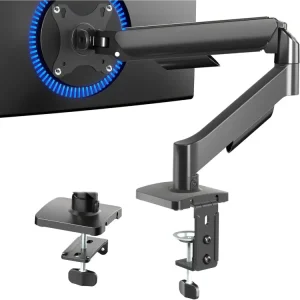 Price: ~00 | Capacity: 4–20 lbs | Mount: C-clamp / GrommetThe Amazon Basics Premium is widely considered the best value monitor arm on the market. It uses a gas spring mechanism (licensed from Ergotron’s LX design) that provides effortless height adjustment. It supports screens up to 32 inches and has a clean look with built-in cable management. For the vast majority of remote workers with a single monitor, this is the one to buy.Best for: Most remote workers with a single monitor setup. The sweet spot of quality and price.
Pros
- Smooth gas-spring adjustment at a reasonable price
- 25-lb weight capacity covers most monitors
- Solid build quality – comparable to arms costing 2x more
- Simple assembly with clear instructions
- Clean professional look that fits any desk
Cons
- Limited to 2.4-inch desk thickness without drilling
- Cable management routing is basic
- Only available in black
- No USB passthrough or extras
- Warranty is shorter than Ergotron 10-year coverage
2. HUANUO Single Monitor Mount — Best Budget
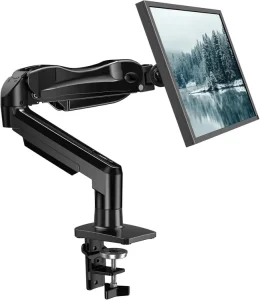 Price: ~5 | Capacity: 4–14 lbs | Mount: C-clamp / GrommetAt 5, the HUANUO is almost disposable — but it holds up surprisingly well. The tension-arm design is adjustable with a hex key, and once you set it, it stays put. It lacks the smooth gas spring feel of premium arms, but for a secondary monitor or a budget-first build, it gets the job done.Best for: Budget builds, secondary monitors, students, part-time WFH
Pros
- Unbeatable price at 5-45
- Solid construction for the cost
- VESA 75×75 and 100×100 compatible
- Cable management clips included
- Includes both clamp and grommet mounting
Cons
- Only single monitor support
- No USB ports built in
- Desk clamp could be wider
- Tension arm – stiffer adjustment than gas spring
- One-year warranty only
3. Ergotron LX — Best Premium Single Monitor Arm
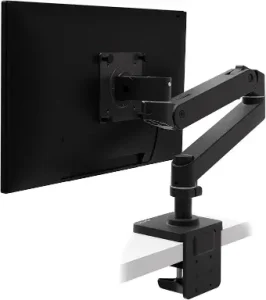 Price: ~80 | Capacity: 7–25 lbs | Mount: C-clamp / GrommetThe Ergotron LX is the industry gold standard. It supports up to 25 lbs (enough for most 34-inch ultrawides), has an incredibly smooth gas spring mechanism, and is built to last a decade or more. The range of motion is unmatched — 13 inches of height adjustment, 180 degrees of rotation, and 360-degree pan. It’s expensive, but it’s also probably the last monitor arm you’ll ever buy.Best for: Heavy monitors, ultrawide screens, professionals who adjust position frequently
Pros
- Best-in-class gas-spring smoothness
- 10-year warranty – built to last
- 25-lb capacity handles most monitors
- Polished fit and finish throughout
- Excellent cable management system
Cons
- Higher price at ~70-190
- Only available in silver and white
- Base clamp takes up slightly more desk edge space
- No quick-release VESA plate
- Adjustment tension requires tools for fine-tuning
4. VIVO Dual Monitor Stand — Best Value Dual Arm
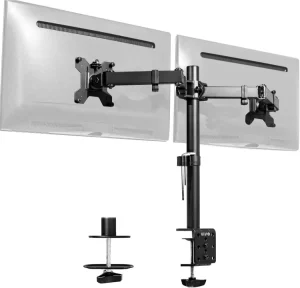 Price: ~0 | Capacity: Up to 22 lbs per arm | Mount: C-clamp / GrommetFor dual monitor setups on a budget, the VIVO is the clear winner. Two fully articulating arms with gas springs for under 0 is incredible value. Each arm supports up to 22 lbs and fits screens up to 27 inches. Assembly takes about 20 minutes and the cable management clips keep things tidy.Best for: Developers, designers, analysts running two 24-27″ monitors on a budget
Pros
- Best value dual arm at ~0
- Each arm holds up to 22 lbs
- Fits two 27-inch monitors easily
- Includes both clamp and grommet mount options
- Simple installation with clear instructions
Cons
- Tension adjustment not gas spring – less smooth
- Arms can sag slightly over time with heavy monitors
- Cable management clips feel flimsy
- Limited height range compared to premium arms
- Build quality reflects budget price point
5. Ergotron LX Dual Stacking — Best Premium Dual Monitor Arm
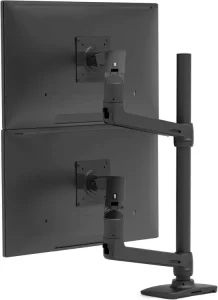 Price: ~30 | Capacity: 7–25 lbs per arm | Mount: Pole + C-clamp / GrommetThe LX Dual Stacking uses a center pole with two LX arms stacked vertically. It takes up minimal desk space, and each arm has the same premium gas spring as the single LX. The vertical stacking design is ideal for setups where you want one monitor above the other, or for maximizing space on a standing desk.Best for: Power users with two heavy monitors who want the absolute best build quality
Pros
- Stacked configuration saves horizontal desk space
- Premium LX gas-spring movement on both arms
- 10-year warranty coverage
- Handles two monitors up to 25 lbs each
- Clean cable management built into arms
Cons
- Premium price ~00+
- Stacked setup requires more vertical clearance
- Installation takes longer than single arms
- Overkill for single-monitor users
- Not ideal for monitors above 32 inches
6. Ergotron HX — Best Heavy Duty
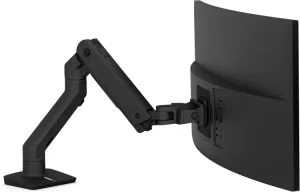 Price: ~80 | Capacity: Up to 42 lbs | Mount: C-clamp / GrommetIf you’re running a 49-inch ultrawide or a 40-inch above 20 lbs, the Ergotron HX is your only real option. It’s built like a tank and handles up to 42 lbs — enough for even the heaviest displays. The gas spring is tuned specifically for heavy monitors, so it won’t sag or drift. It’s expensive, heavy, and overkill for standard setups, but for ultrawide owners, it’s essential.Best for: Ultrawide monitor owners (Samsung Odyssey, LG, Dell 49″), heavy monitors over 25 lbs
Pros
- Holds monitors up to 42 lbs – handles ultrawides
- Smooth gas-spring movement despite heavy load
- 10-year Ergotron warranty
- Exceptional build quality and stability
- Height range accommodates standing desks
Cons
- Expensive at ~80
- Overkill for standard 24-27 inch monitors
- Heavier base requires sturdy desk
- Installation is more involved than lighter arms
- Limited color options
Comparison Table
| Model | Price | Capacity | Monitors | Mechanism | Warranty | Best For |
|---|---|---|---|---|---|---|
| Amazon Basics Premium | ~00 | 4–20 lbs | Single | Gas spring | 1 year | Best overall |
| HUANUO Single | ~5 | 4–14 lbs | Single | Tension | 1 year | Budget |
| Ergotron LX | ~80 | 7–25 lbs | Single | Gas spring | 10 years | Premium single |
| VIVO Dual | ~0 | 22 lbs/arm | Dual | Gas spring | 3 years | Best value dual |
| Ergotron LX Dual | ~30 | 25 lbs/arm | Dual | Gas spring | 10 years | Premium dual |
| Ergotron HX | ~80 | Up to 42 lbs | Single | Gas spring | 10 years | Heavy duty |
Best Monitor Arms Under 00
You don’t need to spend a fortune to get a quality monitor arm. Every arm we tested under $300 performs well for standard home office use. Here’s how the budget-friendly options break down:Amazon Basics Premium Single (00-120): Our top overall pick and the best value under $300. It handles monitors up to 25 lbs with smooth gas-spring adjustment. Unless you need dual monitors or heavy-duty support, this is the one to buy.HUANUO Single Monitor Mount (5-45): The best budget pick under 0. It’s a tension arm rather than gas spring, so adjustments aren’t as buttery, but it holds your monitor securely and costs less than a decent lunch.VIVO Dual Monitor Stand (5-65): If you run two monitors, this is the best value dual arm under $300. Each arm handles up to 22 lbs – enough for two 27-inch displays. At roughly 0, it’s the cheapest way to get both screens off your desk.Ergotron LX (70-190): For those who want premium build quality without crossing 00. The 10-year warranty, polished movement, and 25-lb capacity make it the best long-term investment among sub-00 options. If the Amazon Basics feels slightly plasticky to you, the LX is the upgrade.All four of these arms fit standard desks up to 2.4 inches thick without drilling. If you have an unusually thick desk or need an ultrawide monitor mount, step up to the Ergotron HX.Single vs Dual Monitor Arm: How to Choose
Deciding between a single or dual monitor arm setup depends on your workflow. Here’s how to pick:- Single monitor arm — Best for focused deep work. If you primarily use one large monitor (27″–34″), a quality single arm like the Ergotron LX gives you the most desk space back and keeps your setup clean. A best monitor arm for dual monitors may seem like the obvious choice for productivity, but many remote workers actually find a single ultrawide monitor with a solid arm is more efficient.
- Dual monitor arm — Best for multitasking workflows. Developers, designers, and analysts who need reference material on one screen while working on another benefit most. The VIVO Dual at ~0 proves you don’t need to spend hundreds for a functional dual setup.
- Dual vs two single arms — Two separate arms give you more flexibility in positioning each monitor independently. If you have monitors of different sizes or want maximum adjustability, buy two single arms rather than one dual arm.
Monitor Arm vs. Built-In Stand: Is It Worth It?
Short answer: yes. Here’s what you gain:- 10–15 inches of reclaimed desk space — the single biggest space-saving hack for any home office
- Better ergonomics — adjust your monitor to eye level instantly, reducing neck strain
- Cleaner cable management — most arms have built-in channels to hide cables
- Flexibility — switch between sitting and standing positions without adjusting your monitor height separately
Frequently Asked Questions
Are monitor arms universal?
Almost all monitors use the VESA standard (75x75mm or 100x100mm hole pattern). Check your monitor specs to confirm. Some ultrawides and older monitors use non-standard patterns — those need adapters.Will a monitor arm damage my desk?
Not with proper installation. Most arms include padding under the clamp to protect your desk surface. If you have a glass desk, skip clamp mounts and use the grommet hole instead, or buy a desk clamp reinforcement plate.Can I use a monitor arm with a standing desk?
Yes — and it’s highly recommended. A monitor arm makes transitioning between sitting and standing seamless. Just adjust the arm height when you change positions, rather than tilting your monitor on its stand.Can monitor arms hold ultrawide monitors?
Yes, but you need the right arm. Standard arms top out around 20 lbs — most 34″ ultrawides weigh 12-15 lbs and work fine. For 49″ ultrawides (Samsung Odyssey G9, etc.), you need the Ergotron HX (42 lb capacity).Final Verdict
A monitor arm is one of the cheapest upgrades that dramatically improves your desk experience. Start with the Amazon Basics Premium for the best all-around value, or grab a HUANUO if you’re on a tight budget. If you have a heavy ultrawide, invest in the Ergotron LX or HX — the 10-year warranty and premium build quality make it a buy-it-for-life purchase.For more home office setup tips, check out our guide to the best standing desks for remote work and best noise-canceling headphones.Related Gear
Looking for more ways to optimize your home office setup? Check out these related guides: This post contains affiliate links. If you purchase through these links, I may earn a small commission at no extra cost to you. We only recommend products we have tested and believe in.
David Park researches and reviews productivity software, AI tools, and automation workflows. He helps professionals work smarter by finding the tools that actually deliver results.