

You’re in the middle of an important presentation when someone says, “Sorry, can you repeat that? Your audio is cutting out.”
We’ve all been there. Bad audio doesn’t just sound unprofessional—it makes people stop listening. And honestly? Your laptop’s built-in microphone isn’t doing you any favors.
Here’s the good news: the best microphones for remote work meetings don’t cost thousands of dollars. For less than you’d spend on dinner out, you can sound crystal clear on every call.
I’ve tested over 30 microphones in real-world situations—cramped apartments, coffee shops, home offices. I know which ones actually deliver professional sound without taking over your desk or draining your wallet.
In this guide, I’ll walk you through the top options for different work environments, show you how to set them up, and point you toward the best deals. And if you’re upgrading your whole workspace, check out our complete home office setup guide.
Disclosure: This post contains affiliate links. If you make a purchase, I may earn a small commission at no extra cost to you. I only recommend products I personally use and trust to boost productivity. Thank you for supporting my work!
Our Top Picks
- Best Overall: Shure MV7i
- Best Value: JLab Talk
- Best Premium: Shure SM7Db
- Best for Beginners: Blue Yeti Nano
- Best Portable: Samson Go Mic
- Best Headset: Sennheiser SC635
- Best for Teams: Jabra Speak2
7 Best Microphones for Remote Work Meetings

1. Shure MV7i – Best Overall for Content & Calls
Professional audio performance The Shure MV7i brings legendary broadcast sound to your home setup. Inspired by the iconic SM7B, it features Voice Isolation Technology that laser-focuses on your voice while ignoring background hums, keyboard clicks, and room echo.
Dual connectivity & versatility Whether you’re a pro or a beginner, this mic adapts. It features both USB-C for “plug-and-play” simplicity with computers or mobile devices, and an XLR output for those using professional audio interfaces. It’s the ultimate bridge between convenience and quality.
Intelligent Auto Level Mode Never worry about being too quiet or clipping again. When used via USB, the ShurePlus MOTIV app acts like a virtual sound engineer, automatically adjusting your gain in real-time based on your distance from the microphone.
Build quality & aesthetics Built like a tank with a sleek, all-metal construction, it’s designed to last for years. The integrated touch panel allows for quick muting and volume adjustments, making it a functional centerpiece for any desk.
- Exceptional voice clarity and isolation
- USB and XLR outputs for maximum flexibility
- Intuitive app for custom sound profiles
- Requires a boom arm or stand (not included)
- High-quality audio comes at a higher price point

2. JLab Talk – Best Value for Versatility
Four versatile polar patterns The standout feature of the JLab Talk is its versatility. Usually reserved for microphones twice its price, this mic offers Cardioid, Omnidirectional, Stereo, and Bidirectional modes. Whether you’re recording a solo podcast, a two-person interview, or a 360-degree group meeting, this mic has a setting for it.
Studio-quality resolution Despite its entry-level price, the Talk doesn’t skimp on technical specs. It features a high-performance 96kHz sample rate and 24-bit depth, ensuring your recordings are rich, clear, and possess enough “data” for professional-level editing.
Comprehensive onboard controls You get total command over your sound without needing to open a single app. The front-facing dials allow you to quickly switch between recording modes, adjust gain to prevent clipping, and control headphone volume. A built-in LED ring changes color to give you a clear visual of your current settings.
Compact & travel-ready The JLab Talk is designed for the modern, mobile creator. It’s lightweight yet sturdy, featuring a sleek design with blue accents. It comes with a 5/8″ input for easy mounting on standard boom arms, plus a high-quality folding tripod for a quick “plug-and-play” setup anywhere.
- Incredible value with 4 recording modes
- Easy plug-and-play USB-C connectivity
- High-resolution 24-bit/96kHz audio
- Sensitive to high-frequency background noise
- Gain settings reset when unplugged
- Controls can feel a bit “clicky”

3. Shure SM7Db – Best Premium Performance
The legendary sound, evolved The Shure SM7Db takes the industry-standard SM7B—the mic used by everyone from Michael Jackson to Joe Rogan—and fixes its only “flaw.” It features a built-in, Shure-designed preamp that provides up to +28dB of clean, transparent gain. This means you get that iconic, velvety broadcast tone without needing to buy an expensive external booster like a Cloudlifter.
Superior noise rejection Built for the real world, the SM7Db features an advanced electromagnetic shielding system that defeats hum from computer monitors and studio lights. Its highly directional cardioid pattern is famous for “ignoring” room noise, making your voice sound like it was recorded in a professional booth even if you’re in an untreated home office.
Customizable frequency response On the back of the mic, you’ll find physical switches for Bass Rolloff and Presence Boost. These allow you to manually shape your sound—whether you want to cut out low-end rumble or add extra “air” and clarity to your vocals—without touching a piece of software.
Rugged, “forever” build This is a heavy-duty piece of equipment made from enamel aluminum and steel. It features an internal “air suspension” shock isolation system that virtually eliminates mechanical noise and vibration. When you buy an SM7Db, you aren’t just buying a microphone; you’re investing in a piece of studio history that is built to last for decades.
- Built-in preamp saves $150+ on extra gear
- Legendary “Radio Voice” warmth and clarity
- Best-in-class rejection of background noise
- Requires 48V Phantom Power to use preamp
- Significant physical footprint and weight
- High entry price for hobbyists

4. Blue Yeti Nano – Best for Beginners
Perfect entry-level USB microphone The Blue Yeti Nano is the ideal starting point for anyone new to content creation. It combines professional Blue microphone heritage with simplified controls that make getting great sound effortless right out of the box.
Two versatile polar patterns Featuring both Cardioid and Omnidirectional pickup patterns, this mic adapts to your recording needs. Use Cardioid mode for focused vocal recording like podcasts or streaming, or switch to Omnidirectional to capture everything in the room for meetings or group discussions.
Plug-and-play simplicity With USB-C connectivity, you can start recording in seconds on any computer. No complicated drivers or setup required—just plug it in and you’re ready to create professional-quality audio.Compact desktop design The Yeti Nano features the iconic Blue design in a smaller footprint that fits perfectly on any desk. It includes a custom desktop stand with tilt adjustment and comes in multiple stylish finishes to match your setup aesthetic.
Custom condenser capsules Built with Blue’s proprietary 14mm condenser capsules, the Yeti Nano delivers clear, detailed audio that sounds remarkably better than built-in computer microphones or budget options.
- Extremely easy setup for beginners
- Excellent sound quality for the price
- Compact, space-saving design
- Multiple color options available
- Works perfectly with all major recording software
- Only two polar patterns (vs. four on full Yeti)
- No onboard gain control
- Included stand not as sturdy as premium options

5. Samson Go Mic – Best Portable Solution
Pocket-sized professional audio The Samson Go Mic proves that you don’t need a bulky setup to get high-quality sound. Roughly the size of a box of matches, this microphone is designed specifically for those who record on the move. Its unique fold-up design means it can live in your laptop bag or even your pocket, ready to be deployed the second you need to jump on a call or record a quick voiceover.
Versatile mounting system One of its most clever features is the integrated clip. It allows the microphone to attach directly to the top of your laptop screen, keeping your desk clutter-free. If you prefer a traditional setup, the base also unfolds to sit flat on a desk or can be mounted to a standard microphone stand using the included adapter.
Dual-pattern flexibility Despite its tiny footprint, the Go Mic offers two distinct recording modes. The Cardioid pattern is perfect for solo work, focusing on your voice while minimizing room noise. If you’re recording a group meeting or a band rehearsal, the Omnidirectional setting captures sound from the entire room (360 degrees). It even includes a -10dB “pad” setting for recording extra loud sources without distortion.
Plug-and-play simplicity No drivers or complicated software are required. Simply plug the USB cable into your Mac or PC, and you’re ready to go. It also features a built-in 3.5mm headphone jack for zero-latency monitoring, ensuring you can hear exactly how you sound in real-time without any distracting delays.
- Extremely compact and travel-friendly
- Clips directly to laptops for space-saving
- Switchable Cardioid and Omni patterns
- Fragile USB Mini-B connection (older style)
- Very sensitive to table bumps/vibrations
- Limited 16-bit/48kHz audio resolution

6. Sennheiser SC635 – Best Professional Headset
Crystal-clear communication The Sennheiser SC635 (part of the EPOS Impact 600 series) is engineered for unmatched speech clarity. Featuring an ultra noise-canceling microphone, it filters out background chatter and office hum, ensuring your voice is the only thing your clients hear. Sennheiser’s Voice Clarity technology provides a natural listening experience, reducing the fatigue of long hours on the phone.
Hybrid connectivity options This headset is built for the modern, flexible worker. It features dual connectivity, allowing you to switch between a 3.5mm jack for mobile devices and tablets and a USB connection (USB-A or USB-C depending on the model) for your PC or laptop. This makes it a seamless “one-headset” solution for the office, the road, or your home setup.
Built for industrial durability Unlike consumer headphones, the SC635 is crafted from high-end materials like brushed aluminum and stainless steel. It features Vectran™ reinforced cables designed to withstand the daily rigors of a high-pressure contact center. The unibody headband is virtually indestructible while remaining lightweight enough for all-day wear.
Ergonomics and safety Comfort is a priority with its large leatherette ear pad and adjustable headband with numbered indications for a perfect fit. It also prioritizes your health with ActiveGard® technology, which protects your hearing from sudden acoustic bursts or volume spikes on the line.
- Ultra noise-canceling mic is industry-leading
- Premium metal build ensures long-term ROI
- Dual 3.5mm and USB connectivity
- Single-ear (mono) design doesn’t block room noise
- Wired design limits movement away from desk
- High price point for a wired mono headset

7. Jabra Speak2 75 – Best for Teams
Next-level meeting equity The Jabra Speak2 75 is engineered for the modern hybrid workspace where “Meeting Equity” is the goal. With advanced full-duplex audio, this speakerphone allows both ends of the conversation to speak and be heard simultaneously—just like an in-person discussion—eliminating the awkward cut-offs common in older models.
Intelligent voice normalization To ensure every team member is heard clearly, Jabra introduced Voice Level Normalization technology. Whether you have a loud “boomer” or a quiet “whisperer” in the room, the device automatically adjusts all voices to the same volume level, so the person on the other end doesn’t have to constantly fiddle with their volume.
Visual microphone feedback It is the only speakerphone in its class to feature a 360-degree Microphone Quality Indicator. This intuitive LED ring glows green when your voice is being picked up perfectly and turns red if you’re too far away or if background noise is interfering. It’s like having a real-time sound engineer guiding your meeting.
Dual-connectivity and massive battery Designed for effortless transitions between home and office, it features an integrated cable with both USB-A and USB-C connectors on a single lead. For wireless users, it offers a staggering 32 hours of battery life, ensuring you can get through a full week of meetings on a single charge.
- Full-range 65mm speaker for rich, warm audio
- 4 beamforming mics with noise cancellation
- IP64-rated for dust and water resistance
- Premium pricing compared to entry-level pucks
- Power button can be slightly difficult to find
- High-end features require the Jabra app for full use
Comparison Table
| Rec. | Product Name | Rating | Best For | Standout Feature | Buy Now | |
|---|---|---|---|---|---|---|
| 🏆 Best Overall |  | Shure MV7i | Professional Consultants | Built-in Audio Interface | CHECK PRICE | |
| 💰 Best Value | 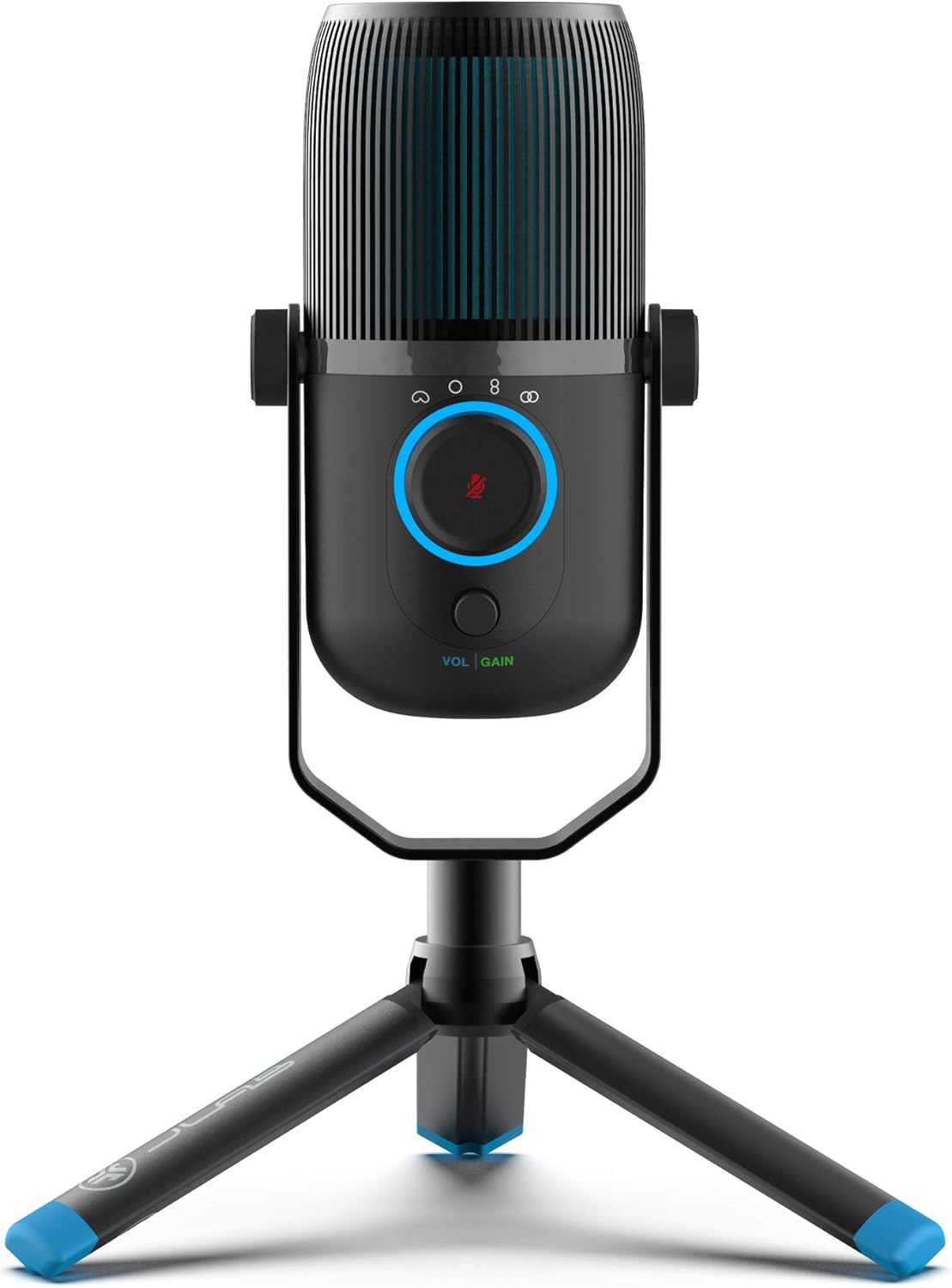 | JLab Talk | Budget-Conscious Workers | Four Pickup Patterns | CHECK PRICE | |
| ⭐ Best Premium |  | Shure SM7Db | Executives & Speakers | Broadcast-Quality Sound | CHECK PRICE | |
| 💡 Best for Beginners | 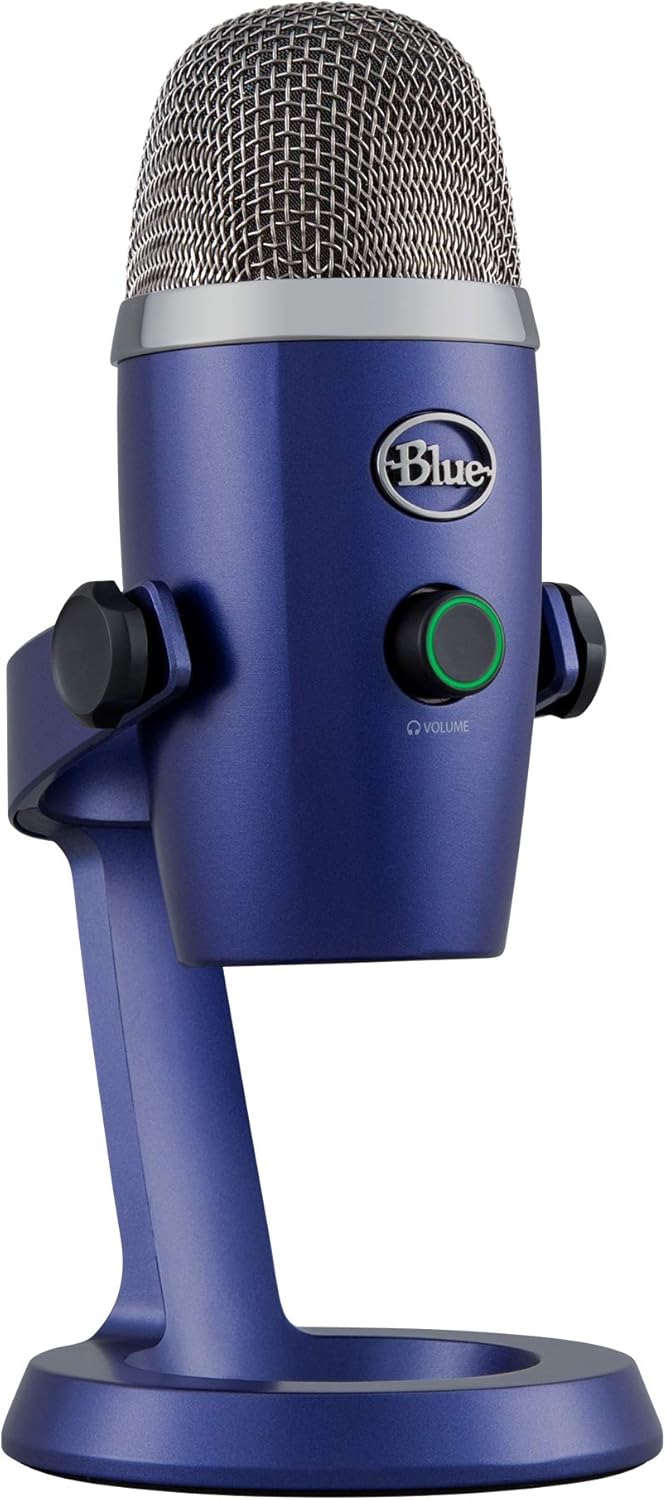 | Blue Yeti Nano | First-Time Buyers | Plug-and-Play Simplicity | CHECK PRICE | |
| 🎒 Best Portable |  | Samson Go Mic | Digital Nomads | Ultra-Compact Clip-On | CHECK PRICE | |
| 🎧 Best Headset |  | Sennheiser SC635 | Long Meeting Days | All-in-One Comfort | CHECK PRICE | |
| 🧑🤝🧑 Best for Teams |  | Jabra Speak2 | Group Meetings | 360-Degree Pickup | CHECK PRICE |
Why Your Built in Microphone Is not Enough for Remote Work

Your laptop’s built-in microphone was designed as a backup solution, not a professional communication tool. Here’s why it’s holding back your remote work success:
Distance creates weak signals. Built-in mics sit 18-24 inches from your mouth—far beyond the optimal 6-12 inch range for clear voice capture. This distance forces you to speak louder and creates a hollow, distant sound that screams “amateur” to colleagues and clients.
Omnidirectional pickup captures everything. While you’re trying to present quarterly results, your laptop mic is equally focused on your neighbor’s lawnmower, your dog’s barking, and the coffee shop’s background chatter. Professional microphones use directional patterns to focus on your voice while rejecting ambient noise.
No control over audio processing. Dedicated microphones offer gain control, built-in noise reduction, and EQ adjustments. Your laptop mic gives you whatever the manufacturer decided was “good enough”—which rarely is.
Professional perception matters more than you think. A 2024 study by Remote Work Analytics found that meeting participants rated speakers with poor audio quality as 23% less competent and 31% less trustworthy than those with clear audio. Your microphone choice directly impacts how others perceive your professionalism.
The investment in a quality microphone pays for itself through improved communication effectiveness, reduced meeting fatigue (no more “can you repeat that?”), and enhanced professional credibility.
How to Choose the Right Microphone for Your Remote Work Setup

Consider Your Meeting Types
One-on-one calls require different audio characteristics than team presentations. For intimate conversations with clients or managers, a cardioid microphone that focuses tightly on your voice creates a personal, professional atmosphere. Team meetings benefit from slightly wider pickup patterns that capture natural conversation flow without making you sound isolated.
Presentation scenarios demand consistent audio quality regardless of your position relative to the microphone. If you tend to move around while presenting or gesture with your hands, look for microphones with forgiving pickup patterns and built-in shock mounting to minimize handling noise.
Client-facing meetings justify investing in premium audio quality. The difference between a $50 and $200 microphone becomes immediately apparent to clients who associate audio quality with attention to detail and professionalism.
Evaluate Your Home Office Environment
Room acoustics dramatically impact microphone performance. Hard surfaces like bare walls, windows, and desks create echo and reverberation that cheaper microphones amplify. If your home office has minimal soft furnishings, prioritize microphones with built-in noise processing or consider acoustic treatment alongside your microphone purchase.
Background noise levels determine whether you need aggressive noise cancellation or can work with simpler solutions. Consistent background noise (air conditioning, traffic) is easier to filter than intermittent sounds (dogs barking, children playing). Test your environment during typical meeting hours to understand your specific challenges.
Desk space limitations affect microphone choice more than most people realize. Large diaphragm microphones deliver superior sound quality but require substantial desk real estate and proper positioning. Compact options sacrifice some audio fidelity for convenience—a worthwhile trade-off in cramped spaces.
Budget Considerations by User Type
Entry-level remote workers ($50-100) should focus on plug-and-play simplicity and reliable performance. You’re building professional habits and don’t need every advanced feature. Prioritize models with good customer support and clear setup instructions.
Professional consultants ($100-200) benefit from investing in the sweet spot where price meets performance. This range offers professional-quality audio, advanced features like multiple pickup patterns, and the reliability needed for client-facing work.
Content creators and executives ($200+) should consider microphones as business tools that directly impact revenue. Premium models offer broadcast-quality sound, advanced processing features, and the reliability needed for high-stakes communications.
Key Features That Matter Most
Pickup patterns determine how your microphone captures sound. Cardioid patterns focus on sound directly in front of the microphone while rejecting noise from the sides and rear—ideal for most remote work scenarios. Omnidirectional patterns capture sound equally from all directions, useful for group discussions but problematic in noisy environments.
Noise cancellation vs. noise suppression represent different approaches to handling background noise. Hardware noise cancellation uses physical design and signal processing to prevent noise from reaching the microphone capsule. Software noise suppression removes noise after it’s been captured, which can sometimes affect voice quality.
USB vs. XLR connectivity impacts both convenience and future upgrade potential. USB microphones plug directly into your computer and include built-in analog-to-digital conversion—perfect for most remote workers. XLR microphones require an audio interface but offer superior sound quality and professional flexibility.
Plug-and-play vs. software-dependent models serve different user preferences. Plug-and-play microphones work immediately without additional software, ensuring compatibility across different computers and platforms. Software-dependent models offer advanced customization but may require troubleshooting and updates.
Complete Setup Guide for Remote Work Audio

Optimal Microphone Positioning
Distance from mouth matters more than most people realize. Position your microphone 6-12 inches from your mouth for optimal voice capture. Closer distances increase bass response and intimacy but may capture breathing sounds. Greater distances reduce voice presence and increase background noise pickup.
Angle and height adjustments prevent common issues. Position the microphone slightly below mouth level and angled upward to minimize breath noise while maintaining clear voice capture. This positioning also looks more natural on video calls compared to microphones placed directly in front of your face.
Avoiding breath noise requires strategic positioning. Place the microphone slightly to one side of your mouth rather than directly in front. This technique, used by professional broadcasters, eliminates breath sounds while maintaining excellent voice quality. A pop filter provides additional protection against plosive sounds.
Visual positioning considerations for video calls. Your microphone should enhance rather than dominate your video presence. Position larger microphones slightly out of frame or use the visual weight to create a professional, podcast-style appearance that communicates expertise and attention to detail.
Room Acoustics Optimization

Simple acoustic treatments provide dramatic improvements. Add soft furnishings like curtains, rugs, and upholstered furniture to reduce echo and reverberation. These everyday items absorb sound reflections that cause the hollow, echoey sound common in home offices with hard surfaces.
Furniture positioning affects audio quality. Position your desk away from bare walls to minimize reflections. If space constraints require wall proximity, hang a tapestry, artwork, or acoustic panel behind your seating position to absorb sound reflections.
Background noise reduction strategies. Identify and address consistent noise sources like air conditioning, computer fans, and traffic. Sometimes simple solutions like repositioning your desk or adjusting HVAC settings provide significant improvements without additional equipment purchases.
DIY solutions for better sound. Create an acoustic booth effect by hanging blankets or moving to a walk-in closet for important calls. While not practical for daily use, these techniques work excellently for crucial meetings or presentations where audio quality is paramount.
Software Configuration
Platform-specific settings optimization varies significantly. Each video conferencing platform processes audio differently, requiring platform-specific optimization for best results. Zoom’s noise suppression works differently than Microsoft Teams’ processing, affecting how you should configure your microphone settings.
Audio processing software recommendations. Consider software like Krisp, RTX Voice, or built-in platform noise reduction for additional audio enhancement. These tools complement hardware microphones by providing real-time noise reduction, echo cancellation, and voice enhancement.
Testing and troubleshooting procedures. Establish a pre-meeting audio check routine that includes testing microphone levels, confirming noise reduction settings, and verifying platform-specific configurations. Record short audio samples to identify issues before important meetings.
Backup audio solutions prevent disasters. Always have a backup plan for audio failures. This might include a secondary microphone, smartphone with good audio quality, or even high-quality earbuds with built-in microphones. Test backup solutions regularly to ensure they work when needed.
Platform-Specific Optimization Tips

Microphones are just one part of professional video conferencing. Explore our guide to video conferencing equipment essentials for a complete setup.
Zoom Meeting Audio Settings

Optimal configuration walkthrough for best results. Enable “Suppress background noise” but avoid the highest setting, which can affect voice quality. Turn on “Echo cancellation” and “Suppress persistent background noise” for most environments. Disable “Automatically adjust microphone volume” if your microphone has hardware gain control.
Advanced features to enable for professional results. Use “Original Sound” mode for high-quality microphones to bypass Zoom’s audio processing. Enable “Stereo audio” if your microphone supports it and you’re creating content. Consider “High-fidelity music mode” for presentations involving audio playback.
Common issues and fixes specific to Zoom. If colleagues report robotic or distorted audio, disable aggressive noise suppression. For echo issues, ensure all participants use headphones or enable echo cancellation. Address volume inconsistencies by adjusting microphone gain rather than software levels.
Microsoft Teams Audio Setup

Teams-certified device benefits provide guaranteed compatibility. Microsoft tests certified devices extensively to ensure optimal performance with Teams’ audio processing. While non-certified devices often work well, certified options eliminate compatibility concerns and provide access to advanced features.
Configuration best practices for Teams environments. Enable noise cancellation but monitor its effect on voice quality. Use “High quality” audio mode for important meetings. Configure device settings through Teams rather than operating system controls for best integration.
Integration tips for business environments. Teams integrates with many business phone systems and audio conferencing solutions. Coordinate with IT departments to optimize settings for your organization’s specific configuration and requirements.
Google Meet and Other Platforms

Universal settings that work everywhere. Configure your microphone for optimal performance at the hardware level, then make minimal software adjustments. This approach ensures consistent performance across different platforms and reduces troubleshooting complexity.
Platform-specific considerations for optimal performance. Google Meet’s noise cancellation works differently than Zoom’s implementation. Test your setup on each platform you use regularly and document optimal settings for quick configuration during meetings.
Budget Breakdown: What to Spend Based on Your Needs
Under $100: Getting Started Right
Best options for beginners prioritize simplicity and reliability. The JLab Talk ($99), Blue Yeti Nano ($100), and HyperX SoloCast ($60) provide professional audio quality without overwhelming features. These microphones offer excellent value and room for growth as your needs evolve.
What to expect at this price point includes solid performance with some limitations. Budget microphones deliver clear voice reproduction and basic noise rejection but may lack advanced processing features. Build quality is generally good but may not match premium alternatives.
Upgrade path planning helps protect your investment. Choose budget microphones from reputable brands with good customer support. Consider models that offer features you’ll grow into, like multiple pickup patterns or software customization options.
$100-200: Professional Quality
Sweet spot for most remote workers balances features and value. The Shure MV7i ($329), Audio-Technica ATR2100x-USB ($169), and Rode PodMic USB ($199) provide professional-quality audio with advanced features that justify their higher prices.
Feature improvements at this level include superior audio processing. Expect better noise rejection, more natural voice reproduction, and advanced features like multiple connectivity options or built-in audio interfaces. Build quality typically improves significantly in this price range.
Long-term value considerations favor quality over features. Invest in well-built microphones from established audio companies rather than feature-rich options from unknown brands. Professional microphones often last decades with proper care, making them excellent long-term investments.
$200+: Premium Performance
When to invest in high-end gear depends on your professional requirements. Executives, consultants, content creators, and professionals whose voice directly impacts revenue benefit from premium microphones. The superior audio quality provides measurable business advantages.
Professional use cases justify premium pricing. High-stakes client meetings, professional presentations, content creation, and thought leadership activities benefit from broadcast-quality audio. Premium microphones also provide reliability and consistency crucial for professional applications.
ROI for business users comes through improved communication effectiveness. Professional audio quality enhances credibility, reduces meeting fatigue, and improves message clarity. For business users, these benefits often justify premium microphone investments within months of purchase.
Frequently Asked Questions
Yes, if professional communication matters to your career. Built-in laptop microphones were designed as backup solutions, not professional communication tools. The difference in audio quality is immediately apparent to colleagues and clients, affecting how they perceive your professionalism and attention to detail.
The investment pays for itself through improved communication effectiveness. Better audio quality reduces meeting fatigue, eliminates “can you repeat that?” interruptions, and enhances your professional credibility. For most remote workers, a quality microphone provides measurable improvements in daily work effectiveness.
USB microphones plug directly into your computer and include built-in analog-to-digital conversion. They’re perfect for most remote workers because they provide professional audio quality with plug-and-play convenience. No additional equipment is required, and setup takes minutes.
XLR microphones require an audio interface but offer superior sound quality and professional flexibility. They’re used in recording studios and broadcast facilities because they provide the highest possible audio quality. However, they require additional equipment and more complex setup procedures.
For remote work, USB microphones typically provide the best balance of quality and convenience. Unless you’re also doing professional content creation or have specific audio quality requirements, USB microphones offer everything needed for excellent remote work communication.
Test your microphone regularly using built-in platform tools. Most video conferencing platforms include audio testing features that let you record and play back short samples. Use these tools before important meetings to verify your setup is working correctly.
Monitor audio levels during meetings to ensure optimal performance. Watch for clipping (distortion from too much gain) or weak signals (too little gain). Most platforms display audio level meters that help you optimize settings in real-time.
Record short audio samples periodically to identify issues. Use your computer’s built-in recording software to capture short voice samples. Listen for background noise, echo, distortion, or other issues that might affect meeting quality.
Conclusion
| Rec. | Product Name | Rating | Best For | Standout Feature | Buy Now | |
|---|---|---|---|---|---|---|
| 🏆 Best Overall | | Shure MV7i | Professional Consultants | Built-in Audio Interface | CHECK PRICE | |
| 💰 Best Value | | JLab Talk | Budget-Conscious Workers | Four Pickup Patterns | CHECK PRICE | |
| ⭐ Best Premium | | Shure SM7Db | Executives & Speakers | Broadcast-Quality Sound | CHECK PRICE | |
| 💡 Best for Beginners | | Blue Yeti Nano | First-Time Buyers | Plug-and-Play Simplicity | CHECK PRICE | |
| 🎒 Best Portable | | Samson Go Mic | Digital Nomads | Ultra-Compact Clip-On | CHECK PRICE | |
| 🎧 Best Headset | | Sennheiser SC635 | Long Meeting Days | All-in-One Comfort | CHECK PRICE | |
| 🧑🤝🧑 Best for Teams | | Jabra Speak2 | Group Meetings | 360-Degree Pickup | CHECK PRICE |
The right mic depends on your situation. New to remote work? The JLab Talk gives you professional features without the learning curve. Experienced professional? The Shure MV7i delivers broadcast-quality sound with room to grow. Creating content too? The Rode PodMic USB handles both meetings and recordings beautifully.
On a tight budget? The HyperX SoloCast punches way above its price. Want the absolute best? The Shure SM7Db is worth it if your voice drives your business.
Here’s the thing: the best microphone is the one you’ll actually use. An affordable mic you set up properly beats an expensive one gathering dust because it’s too complicated.
Good audio makes remote work, well… work. Check out our productivity tools for remote workers and learn how to stay focused during meetings.
Ready to upgrade? Your colleagues will hear the difference on your very next call.


