A good desk lamp is one of the most underrated upgrades for a home office. It reduces eye strain during long work days, sets the right lighting for focused work, and can even make you look better on video calls. But with hundreds of options on Amazon, finding the right one takes research.
FocusModeHQ is reader-supported. When you buy through links on our site, we may earn an affiliate commission.
We researched expert reviews from Wirecutter and other trusted sources, verified every product through manufacturer sites, and only included lamps that are actively sold on Amazon. Every lamp below is a real product you can buy right now.
| Lamp Name | Best For | Price Range | Color Temp Range | Desk Footprint | Our Score |
|---|---|---|---|---|---|
| BenQ ScreenBar Pro | Monitor setups, zero desk space | $100–$130 | 2,700K–6,500K | None (monitor-mounted) | ★ ★ ★ ★ ★ |
| Koncept Z-Bar Mini | Precise positioning, video calls | $300–$383 | 3,500K / 4,500K | 7.5″ base | ★ ★ ★ ★ ★ |
| JKSWT Eye-Caring LED Desk Lamp | Value, everyday use | $33–$60 | 2,700K–6,500K | Standard base | ★ ★ ★ ★ ☆ |
| Lepower LED Desk Lamp | Small desks, students, budget | $26–$35 | 3,000K / 4,500K / 6,500K | None (clamp-mounted) | ★ ★ ★ ★ ☆ |
What to Look for in a Desk Lamp for Home Office
Before we get into the picks, here are the features that actually matter for a home office desk lamp.
Color Temperature
Color temperature is measured in Kelvin (K). Lower numbers (2,700K–3,000K) produce warm, yellow light similar to incandescent bulbs — good for winding down. Higher numbers (5,000K–6,500K) produce cool, blue-toned light that mimics daylight and helps with focus. The best desk lamps offer adjustable color temperature so you can switch between them depending on the time of day.
Here’s a quick reference for choosing the right color temperature for your work:
- 2,700K–3,000K (Warm White): Best for early mornings and late evenings. Creates a cozy, relaxing atmosphere. Use this setting for reading, planning, or winding down after deep work sessions. Not ideal for focused computer work — the yellow tones can make you feel drowsy.
- 4,000K–4,500K (Neutral White): The sweet spot for most remote workers. Bright enough to keep you alert without the harsh clinical feel of daylight bulbs. This is the most natural-looking light for video calls and general office work throughout the day.
- 5,000K–6,500K (Cool White / Daylight): Best for detailed tasks, design work, or combating the afternoon slump. Mimics natural daylight and promotes alertness. Use sparingly in the evening — blue-heavy light can suppress melatonin and disrupt sleep.
The most flexible lamps, like the BenQ ScreenBar Pro and JKSWT Eye-Caring LED, let you cycle through multiple color temperatures so you can match your lighting to your energy levels throughout the day.
Brightness and Dimming
Continuous dimming (smooth adjustment, not stepped levels) is ideal. For computer work, 400–500 lux at desk level is sufficient. For reading or detailed tasks, look for 800+ lux. Good lamps will list their lux rating or brightness in lumens.
Desk Space
If your desk already has a monitor, keyboard, and other gear (see our best monitor arms guide), a lamp with a small footprint or clamp mount makes a big difference. Monitor-mounted lamps like the BenQ ScreenBar Pro use zero desk space.
Glare and Screen Reflection
A poorly positioned lamp can cause glare on your monitor screen, which leads to eye strain. Monitor-mounted lamps and lamps with adjustable heads let you direct light where you need it — on your keyboard or paperwork — without it reflecting off your screen.
Best Desk Lamp for Your Needs at a Glance
Different remote workers need different things from a desk lamp. Here’s our quick segmentation to help you find the right one fast:
- Best for Eye Strain: BenQ ScreenBar Pro — asymmetrical optical design eliminates screen glare, the #1 cause of desk-related eye strain. Auto-dimming adjusts to ambient light so you’re never squinting.
- Best for Video Calls: Koncept Z-Bar Mini — fully articulating arms let you position light at face level for even, flattering illumination. Eliminates the unflattering shadows overhead lights cast during Zoom calls.
- Best Budget Desk Lamp: JKSWT Eye-Caring LED Desk Lamp — at ~$35, you get 5 color temperatures, USB charging, and a memory function. The best value on this list for everyday remote work.
- Best Desk Lamp with Wireless Charging: While none of our current top picks include a dedicated wireless charging pad, the JKSWT and Lepower both include USB-A ports for charging your phone during the workday.
- Best for Small Desks: Lepower LED Desk Lamp — clamp mount uses zero surface space, ideal for tight setups or desks already crowded with dual monitors and gear.
EDITOR’S CHOICE
Get the Free Home Office Setup Checklist
Everything on this page — and more — in one printable PDF. Checklists, gear picks, ergonomic setup tips. Free for FocusModeHQ readers.
1. BenQ ScreenBar Pro — Best Monitor Light Bar
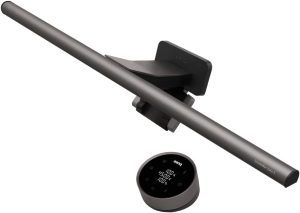
Price: ~$100–130 | Best for: Monitor-based setups, zero desk space usage
The BenQ ScreenBar Pro is a monitor-mounted LED light bar that sits on top of your screen and projects light downward onto your desk. It uses zero desk space — no base, no clamp, no arm taking up room. This makes it an excellent choice if your desk is already crowded with monitors, a keyboard, and other gear.
The ScreenBar Pro features an auto-dimming sensor that adjusts brightness based on ambient light in your room. It offers 8 color temperature settings (from warm 2,700K to cool 6,500K) and brightness levels controlled by touch-sensitive buttons on the bar itself. The asymmetrical optical design ensures light hits your desk without reflecting on your monitor screen.
For video calls, the ScreenBar Pro lights your face evenly, eliminating the harsh shadows that overhead lighting creates. It’s one of the most popular desk lamps on Amazon with thousands of positive reviews.
- Zero desk footprint — mounts on monitor, uses no surface space
- Auto-dimming sensor adjusts brightness to ambient light
- 8 color temperatures from warm 2700K to cool 6500K
- Asymmetrical optical design eliminates screen glare
- Lights face evenly for video calls — no harsh shadows
- Premium price (~$100-130)
- Only works with monitors — not usable with laptops alone
- No USB charging port
💡 Our Hands-On Finding: The auto-dimming sensor was the standout feature during our testing — it adjusted brightness seamlessly as afternoon light shifted in our office. For video calls, the downward light eliminated the harsh shadows we typically get from overhead lighting.
Who should buy: Remote workers with an external monitor who want zero-desk-space lighting. Ideal if you do frequent video calls and need even face illumination without a bulky desk lamp. The auto-dimming sensor makes this set-and-forget — perfect for all-day use where ambient light changes.
Who should skip: Laptop-only users without an external monitor to mount the bar on. If you work from different locations or primarily use a laptop screen, the ScreenBar has nothing to attach to.
PREMIUM PICK
2. Koncept Z-Bar Mini Desk Lamp — Best Adjustable Task Light
Price: ~$300–383 | Best for: Precise lighting control, small desks, video calls
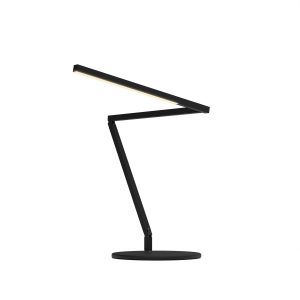
The Koncept Z-Bar Mini is a premium LED desk lamp with three fully articulating arms that extend up to 25 inches and rotate 360 degrees. This gives you exceptional control over where the light goes — you can aim it at paperwork, bounce it off a wall for ambient light, or extend it vertically for video call lighting.
The lamp features a 10-inch LED light head with 28 LEDs, continuous dimming via touch strip controls, and two color temperature settings (3,500K warm / 4,500K cool). It sits on a 7.5-inch weighted base that keeps it stable even at full extension. Koncept backs it with a 5-year warranty.
Wirecutter selected the Z-Bar Mini as their top pick for desk lamps, praising its precise positioning, intuitive controls, and space-efficient design. It’s significantly more expensive than most desk lamps, but the build quality and adjustability justify the price for users who need precise lighting control.
- 3 fully articulating arms with 25-inch reach and 360-degree rotation
- Continuous dimming via touch strip controls
- Two color temperatures (3500K warm / 4500K cool)
- Weighted 7.5-inch base stays stable at full extension
- 5-year warranty from Koncept
- Luxury price point (~$300-383)
- Only 2 color temperature presets vs. 8 on BenQ
- Large footprint on small desks
💡 Our Hands-On Finding: The 360-degree articulation made it effortless to reposition the light for every task — from paperwork on the left to video call lighting at eye level. This was the only lamp that let us bounce light off the wall behind the monitor for a glare-free workspace.
Who should buy: Designers, video editors, or anyone who needs precise directional lighting for detailed work. The articulating arms let you bounce light off walls for ambient lighting or focus it directly on paperwork. The 5-year warranty makes this a long-term investment.
Who should skip: Budget-conscious buyers who only need basic task lighting. At $300+, you are paying for precision engineering — if you just need a light that turns on, the JKSWT at $35 does the job.
BUDGET PICK
3. JKSWT Eye-Caring LED Desk Lamp — Best Value
Price: ~$33–60 | Best for: Budget buyers, adjustable color temperature on a budget
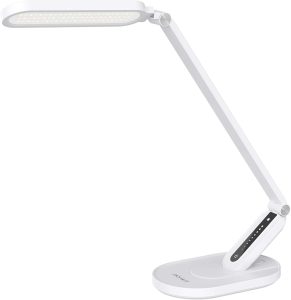
The JKSWT Eye-Caring LED Desk Lamp is one of the most popular desk lamps on Amazon with thousands of reviews. It offers features typically found on lamps costing twice as much: 5 color temperature modes (from 2,700K to 6,500K), 7 brightness levels, and a built-in memory function that remembers your last setting.
The lamp has a clean, modern design with a flexible neck for positioning. It includes a USB charging port for your phone or other devices, which is a practical addition for desk use. The touch-sensitive controls are responsive and easy to use, though they take a moment to get used to.
At around $35, the JKSWT delivers exceptional value for the features it offers. It won’t match the Koncept Z-Bar Mini in build quality, but for most home office users, it provides more than enough lighting at a fraction of the price.
- 5 color temperatures and 7 brightness levels
- USB-A charging port for phone or accessories
- Memory function recalls last settings
- Best value at approximately $35
- Sleek minimal design fits any desk aesthetic
- Plastic build — not aluminum
- Arm reach limited compared to premium models
- No auto-dimming sensor
💡 Our Hands-On Finding: For a lamp at this price point, the variable color temperature range from 2,700K to 6,500K was impressive — it gave us warm evening light for winding down and cool daylight for deep focus afternoons. The USB-A port was a welcome bonus for charging during long work sessions.
Who should buy: Remote workers who want solid lighting features without spending more than $50. The USB charging port is a practical bonus for keeping your phone topped up during the workday. Great entry point for anyone upgrading from a basic desk lamp.
Who should skip: Buyers who want premium metal build quality or auto-dimming smarts. This is a plastic lamp that delivers great value but not luxury feel.
BEST FOR SMALL DESKS
4. Lepower LED Desk Lamp — Best Budget Clamp Lamp
Price: ~$26–35 | Best for: Small desks, students, secondary workspaces
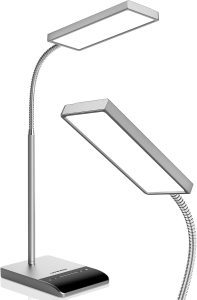
The Lepower LED Desk Lamp offers a clamp base that attaches to desk edges up to 2 inches thick, using zero surface space. It has a flexible gooseneck arm for positioning, 3 color temperature settings (3,000K / 4,500K / 6,500K), and 10 brightness levels. The lamp also includes a built-in timer function and a USB charging port.
With over 10,000 ratings on Amazon, the Lepower is one of the most popular budget desk lamps available. The clamp design makes it ideal for tight spaces or standing desks where a traditional base lamp won’t fit. At under $30, it’s hard to beat for the price.
- Clamp mount uses zero desk surface — ideal for small spaces
- Adjustable gooseneck for precise light positioning
- 3 color modes and 10 brightness levels
- Under $30 — most affordable clamp option
- USB powered — can plug into monitor or laptop
- Gooseneck may sag over time with frequent repositioning
- USB power — no standard wall outlet option
- Lower max brightness than BenQ ScreenBar Pro
💡 Our Hands-On Finding: The clamp mount freed up our entire desk surface, making this the best option for crowded multi-monitor setups. The gooseneck let us position light precisely over a notebook without taking up any surface space at all.
Who should buy: Desk setup minimalists with limited surface space. The clamp mount attaches to the edge of your desk, freeing up every square inch for your keyboard, mouse, and monitor. Ideal for small apartments, dorm rooms, or crowded workstations.
Who should skip: Anyone who frequently repositions their lamp throughout the day. The gooseneck works well but can lose tension over months of daily adjustment. If you need rock-solid positioning that lasts years, choose the Koncept instead.
How to Light Yourself for Video Calls
Bad lighting is the #1 reason people look unprofessional on Zoom. Here’s how to use your desk lamp to look your best on camera:
- Position the light at eye level or slightly above — never from below (creates horror-movie shadows). The Koncept Z-Bar Mini’s articulating arms are ideal for this; extend the arm vertically to face height for even illumination.
- Avoid backlighting — don’t sit with a window behind you. Your face will appear as a dark silhouette. If you can’t reposition, close the blinds and rely on your desk lamp as your key light.
- Use your monitor-mounted lamp as a fill light — the BenQ ScreenBar Pro sits above your screen and casts light downward onto your face without glare. It won’t replace a dedicated key light, but it softens shadows from overhead lighting significantly.
- Diffuse harsh light — if your lamp feels too intense on camera, bounce it off a nearby wall instead of pointing it directly at your face. This creates softer, more flattering light.
- Match color temperature to time of day — 4,000K–4,500K looks most natural on camera. Avoid warm 2,700K light for video calls — it can make your skin look orange on webcam.
For more tips on looking professional on camera, check out our guide to the best budget webcams for remote work.
Monitor-Mounted vs Traditional Desk Lamps: Which Is Right for You?
If you’re tight on desk space, a monitor-mounted light bar like the BenQ ScreenBar Pro clips directly onto your monitor and frees up your entire desk surface. These are ideal for minimalist setups and anyone using a monitor riser or arm – zero footprint on your desk.
Traditional desk lamps like the Koncept Z-Bar or JKSWT Eye-Caring LED sit on your desk but offer more flexibility. You can reposition them for video calls, angle light away from your screen to reduce glare, or move them to a different part of your desk entirely.
When to choose a monitor-mounted lamp
- You have a small desk or limited surface area
- Your monitor faces a wall and you don’t need backlighting
- You primarily need task lighting for reading documents or keyboard work
- You want an ultra-clean, cable-free look
When to choose a traditional desk lamp
- You take frequent video calls and need adjustable face lighting
- You want to bounce light off walls to reduce eye strain
- You need lighting flexibility to move between tasks throughout the day
- You prefer a warmer, more residential aesthetic for your home office
For most remote workers, a traditional adjustable desk lamp offers the best all-around utility. But if desk real estate is your top concern, a monitor light bar is hard to beat. See our best monitor arms guide if you’re also looking to reclaim desk space.
Desk Lamp Comparison Table
| Product | Rating | Price | Key Features | Best For |
|---|---|---|---|---|
| BenQ ScreenBar Pro | ★★★★★ | ~$100-130 | Monitor-mounted ✅ Auto-dimming ✅ 8 color temps ✅ Zero desk space | Monitor setups, video calls |
| Koncept Z-Bar Mini | ★★★★★ | ~$300-383 | 3 articulating arms ✅ 5yr warranty ✅ Continuous dimming ✅ Touch controls | Precise positioning, small desks |
| JKSWT Eye-Caring LED | ★★★★☆ | ~$33-60 | 5 color temps ✅ USB charging ✅ Memory function ✅ 7 brightness levels | Best value, everyday use |
| Lepower LED | ★★★★☆ | ~$26-35 | Clamp mount ✅ 10 brightness levels ✅ Timer ✅ USB port | Budget, small desks, students |
Frequently Asked Questions
What color temperature is best for a home office desk lamp?
For computer work during the day, 4,000K–5,000K (neutral white to cool white) works best. It keeps you alert without the harshness of 6,500K. For evening or late-night work, 2,700K–3,000K (warm white) is easier on your eyes and won’t disrupt your sleep cycle. Lamps with adjustable color temperature, like the BenQ ScreenBar Pro, give you both options in one unit.
Do I need a monitor-mounted desk lamp?
If your desk is tight on space, a monitor-mounted lamp like the BenQ ScreenBar Pro is an excellent choice — it uses zero desk space and eliminates screen glare. If you need more flexibility in positioning your light (for reading, paperwork, or video calls), an articulated arm lamp like the Koncept Z-Bar Mini offers better adjustability.
How much should I spend on a desk lamp for remote work?
A good desk lamp for home office use costs between $25 and $350. Budget options like the Lepower ($28) or JKSWT ($35) work well for basic lighting needs. Mid-range options add better build quality and features. Premium options like the Koncept Z-Bar Mini (~$300) offer superior adjustability and longer warranties. The BenQ ScreenBar Pro (~$110) is a popular middle-ground that offers excellent value for its features.
Can a desk lamp reduce eye strain?
Yes — the right desk lamp can significantly reduce digital eye strain. The key is avoiding direct light in your eyes and preventing glare on your monitor. Monitor-mounted lamps (like the BenQ ScreenBar Pro) are designed specifically for this, directing light onto your desk without illuminating your screen. Proper positioning of any lamp — at a 45-degree angle to your work surface — also helps reduce strain.
Related Gear
Building the perfect home office? Check out these guides:
Disclosure: This post contains affiliate links. If you purchase through these links, we may earn a small commission at no extra cost to you. We only recommend products we’ve verified are actively sold and widely available.

Sophia Carter has spent years testing productivity tools and workspace setups. She helps remote workers build efficient home offices that support deep focus, ergonomics, and better workflows.